Shopify Proxies: How to Choose, Set Up, and Stay Compliant in 2026

If you run a Shopify store, do brand checks, or shop across regions, “Shopify proxies” can sound like a magic switch. In practice, a proxy is simply a network exit you choose to go online through. Used well, it improves stability, access control, and consistency. Used blindly, it adds cost and confusion.
MaskProxy summarizes the concept and typical use cases in a straightforward way on its Shopify Proxies page, and it aligns with the real-world view that proxies are an operations tool rather than a shortcut.
This guide focuses on what most people actually want to know:
- Do I need Shopify proxies for my situation?
- Which type should I buy for my budget and workflow?
- How do I choose a provider without hidden traps?
- How do I get it working quickly?
- What do I do when it’s slow, failing, or shows 429?
- How do I keep everything safe and compliant?
1) Decide whether you need Shopify proxies before you spend money
The simplest rule
If your current internet works fine for Shopify Admin tasks like editing products, handling orders, and basic storefront checks, you probably do not need a proxy.
When proxies usually make sense
Store owners and operators
- Your team needs a consistent business exit IP for predictable access, whitelisting, or controlled office workflows.
- You operate from multiple locations and want fewer “network surprises” during routine admin work.
- Your office or corporate network has strict rules and you need a controlled route for business continuity.
Brands doing legitimate market checks
- You compare how storefronts look across countries for analysis, such as currency display, language defaults, shipping prompts, and content variations.
- You keep checks low-frequency and disciplined, especially when APIs are involved.
Ordinary buyers
- Most “regional issues” are actually cookies, locale settings, payment verification, or account profile, not your IP. A proxy rarely solves these.
When proxies are the wrong tool
- Trying to bypass platform rules or enforcement is high-risk and unnecessary.
- Expecting a proxy to guarantee fewer verification prompts is unrealistic.
- Treating a proxy as a speed booster often backfires because you are adding an extra hop.
One-sentence takeaway: a proxy is a network management tool, not a Shopify shortcut.
Quick decision table
| Situation | Do you likely need a proxy | Where to start |
|---|---|---|
| Small team needs consistent admin access | Often yes | One stable exit IP |
| Light regional storefront checks | Maybe | Small plan in key countries |
| Ordinary buying and browsing | Usually no | Fix cookies, locale, account settings first |
| Anything aimed at evasion | No | Stop and reassess |
2) Understand Shopify proxies using a mail-forwarding analogy
A proxy is a middle stop between you and a website. The website sees the proxy IP instead of your home or office IP.
Think of it like mail:
- Without a proxy, your letter goes from your home address.
- With a proxy, your letter goes through a forwarding service, so the receiver sees the forwarding address.

Four terms you actually need
- IP address: your internet return address.
Conclusion: many access controls and security checks treat IP as one signal. - Location or node: where the proxy appears to be.
Conclusion: location can change what storefront version you see. - Sticky session: staying on the same proxy IP for a period.
Conclusion: sticky sessions usually feel smoother for Shopify Admin work. - Whitelist: a list of allowed IPs for access.
Conclusion: whitelisting is about control and safety.
One common confusion to avoid
Some articles mix “network proxies” with Shopify’s developer feature called an app proxy. App proxy is for routing storefront requests to an app backend, described in the official Shopify app proxy documentation. For most store owners and small teams, this guide is about network proxies, not app development.
3) Choose the right proxy type for Shopify Admin and storefront checks
Instead of memorizing jargon, choose based on what you need most: stability, cost, or geographic coverage.
The four common proxy types in plain English
- Datacenter proxies: often fast and cheaper, but can look less like typical household internet.
- Residential proxies: look like normal home connections and can help with region realism, usually at a higher cost.
- Mobile proxies: come from mobile networks, typically expensive and more variable.
- ISP proxies: often marketed as a stable middle ground, but results depend on the provider.
For comparing “what residential usually implies” in coverage and behavior, Residential Proxies provides a clean checklist-style reference that matches how most buyers evaluate options.
Pick by task so you do not overbuy
For Shopify Admin daily operations
- What matters: fewer disconnects, predictable access, stable login sessions.
- Typical direction: one fixed or static exit rather than frequent rotation.
For regional storefront viewing and market research
- What matters: country coverage, consistent results, careful pacing.
- Typical direction: a small plan that matches the countries you actually check.
One-sentence takeaway: most small teams should start with one stable exit for admin work, then expand only when a specific scenario demands it.
Simple comparison matrix
| Goal | What matters most | Typical starting direction |
|---|---|---|
| Team stability in Shopify Admin | fixed exit, uptime, support | static or dedicated-style plan |
| Regional storefront checks | coverage, consistency | small residential plan |
| Budget-first basic access | price, speed | datacenter plan |
| Uncertain requirements | measurable trial | small test plan plus acceptance checks |
4) Pick a provider using a checklist that reveals the hidden costs
Two proxy plans can look identical on a pricing page and behave very differently in real Shopify workflows. Use an evaluation checklist that you can actually verify.

Ten checks that prevent most mistakes
- Clear billing model: per GB, per IP, per month, or pay-as-you-go
- Authentication options: username/password and/or IP whitelisting
- A dashboard that shows usage, expiry, and connection details
- Support that can troubleshoot real problems, not only templates
- Trial or refund terms that allow a short evaluation
- Location granularity that matches real needs
- Uptime expectations defined in writing
- Security basics: 2FA for the provider panel, access control, credential rotation
- Privacy posture: transparent policy and acceptable use boundaries
- Documentation that matches your setup path: browser, tool, or server
Pricing pages are most useful when you translate them into “effective cost per successful workflow,” such as Shopify Admin sessions that stay stable during peak hours, rather than only comparing sticker price. A structured example is Rotating Residential Proxies Pricing, which makes it easier to compute the cost of your specific checking frequency and target countries.
Low-price warning signs
- “Unlimited everything” without explaining limits
- No clear authentication method explanation
- No refund policy
- No clarity on monitoring, reporting, or support responsiveness
MaskProxy is often evaluated with exactly this checklist because it encourages buyers to match plan structure to actual workflows, rather than selling a one-size-fits-all promise.
5) Get a working setup in 30 minutes using the simplest path
The fastest way to succeed is to start small and stable, then expand only when you have a reason.
Step 1: Decide where you will use the proxy
Choose one:
- Browser only for Shopify Admin workflows
- Operating system-wide proxy for broader apps
- A specific tool used for research or monitoring
- Server or cloud runner for controlled jobs
Step 2: Choose the authentication method
- Username and password is usually easiest to start.
- IP whitelisting is excellent for stable office networks and controlled access.
One-sentence takeaway: beginners start with username/password, teams often graduate to whitelisting for predictable admin access.
Step 3: Start with one stable exit before adding rotation
For Shopify Admin proxy setup, the first goal is simple:
- Does it connect reliably?
- Does Shopify Admin load consistently?
- Is it fast enough for normal work like orders, products, and apps?
Step 4: Apply proxy settings using a universal checklist
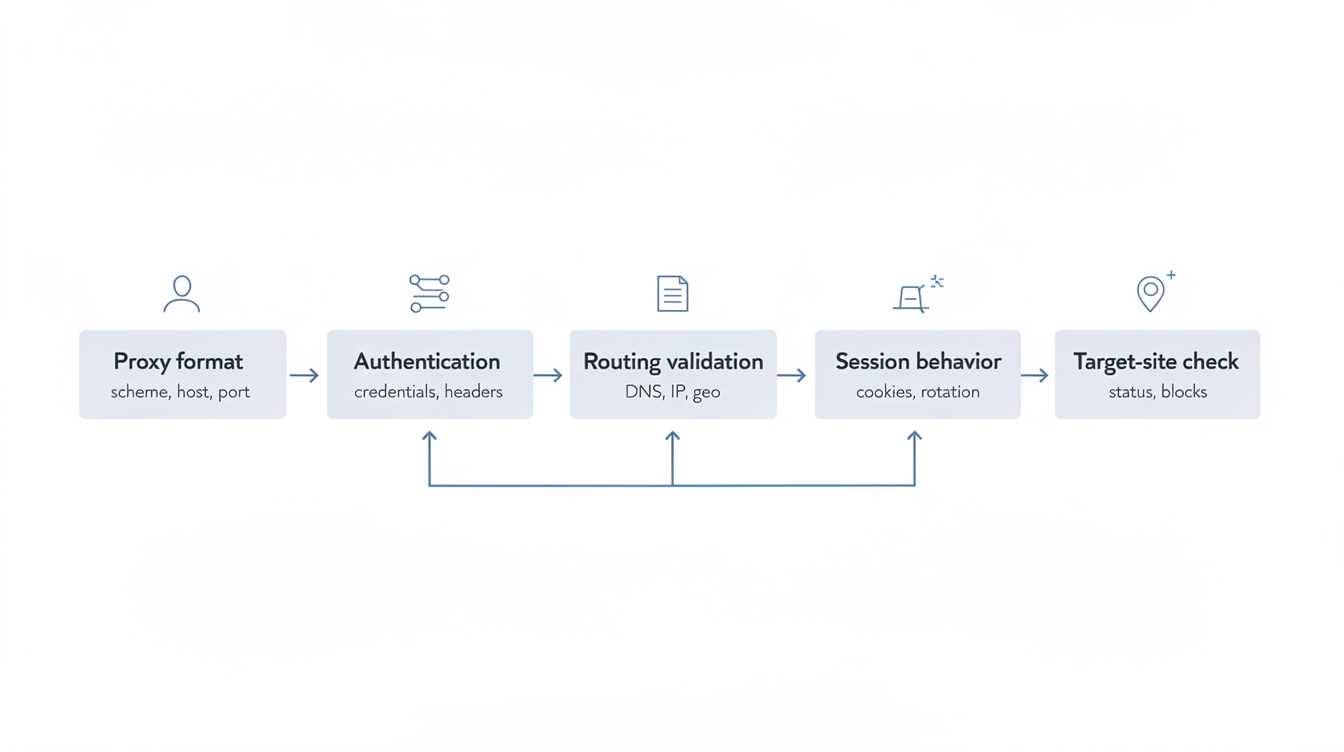
Because menus differ, follow the logic:
- Find proxy settings in your browser, system, or tool
- Enter host and port from your provider
- Enter credentials if required
- Validate your current exit IP using a basic IP check
- Test Shopify Admin and your normal workflow
If you are unsure whether your tool expects HTTP or SOCKS5, Proxy Protocols helps you pick the simplest compatible option before you troubleshoot the wrong layer.

Step 5: Do the security steps that matter most
- Turn on admin account protection using Shopify’s official guidance for two-step authentication.
- Use separate staff roles and least privilege in Shopify Admin.
- Keep credentials out of unknown helper tools or random plugins.
- Keep a simple change log so you can reproduce what worked.
6) Troubleshoot slow speed, disconnects, 429 errors, and location mismatch the calm way
When something breaks, changing everything at once creates confusion. Use layered checks.

Use layered troubleshooting
- Your device and network
- Proxy connection health
- Shopify incidents or broader service issues
- Your workflow pacing and tool behavior
If the platform itself is degraded, checking Shopify Status can save you a lot of time before you dig into settings.
Problem A: It is slower after enabling a proxy
Common causes:
- The proxy node is far away.
- The node is overloaded.
- You are proxying everything instead of only the Shopify workflow that needs it.
What to do:
- Try a closer region.
- Switch to a more stable node or fixed exit.
- Limit proxy use to the specific browser profile used for Shopify Admin.
Problem B: You see 429 Too Many Requests
Human explanation: your tool or workflow is making requests too quickly, and the server wants you to slow down. Cloudflare’s overview of Error 429 is a helpful plain description of what 429 means at the HTTP level.
What to do in a compliant way:
- Slow down your workflow and reduce bursts.
- Add backoff and retry discipline in tooling.
- If you use Shopify APIs, design within official rate limits using Shopify API usage limits rather than trying to brute-force.
One-sentence takeaway: 429 is usually fixed by doing less, more patiently, not by chasing “more IPs.”
Problem C: Proxy authentication errors such as 407
What it usually means:
- Wrong credentials
- Whitelist not updated
- Tool expects a different proxy format
What to do:
- Re-check credentials carefully.
- If using whitelisting, confirm your current public IP.
- Confirm protocol and proxy format requirements in the provider instructions.
Problem D: Location looks wrong
Common reasons:
- Cookies and account profile override location behaviors.
- Browser keeps old localization data.
- Provider location mapping is broader than expected.
What to do:
- Test in a clean browser profile.
- Clear site cookies for the relevant domain when appropriate.
- Try a different node in the same country.
7) Keep proxy usage safe and compliant for long-term operations
A proxy should support safer and more predictable operations, not risky behavior.

Keep your boundary simple
- If you use Shopify APIs, you are bound by the Shopify API License and Terms of Use.
- Account security should be treated as a first-class requirement, not an afterthought, and Shopify’s two-step authentication is a strong baseline.
A safe pattern for small teams
- Fixed exits for predictability
- Role-based access and least privilege
- 2FA and credential rotation hygiene
- Minimal logging that helps troubleshoot without oversharing
- Documented changes so incidents are reproducible
One-sentence takeaway: good proxy usage is about control and accountability.
8) Buy in a way you can review and improve instead of guessing
Start with a minimum viable plan
Instead of buying big bundles:
- Buy a small trial
- Test with real Shopify Admin tasks for three days
- Record results
- Scale only when metrics justify it
Measure real cost, not sticker price
A plan is not cheap if it causes:
- slow admin workflows
- frequent reconnects
- support delays
- operational uncertainty during peak hours
Simple acceptance checklist:
- Stable connections during normal work sessions
- Shopify Admin loads and behaves normally
- Speed feels consistent enough for daily operations
- Support can answer setup and troubleshooting questions clearly
If your goal is stable Shopify Admin access for a small team, a proxy can be a practical network exit when you prioritize fixed exits, disciplined usage, and account security. For a baseline option that aligns with “fewer moving parts,” many teams evaluate Static Residential Proxies because static exits fit day-to-day admin workflows where consistency matters most.

Daniel Harris is a Content Manager and Full-Stack SEO Specialist with 7+ years of hands-on experience across content strategy and technical SEO. He writes about proxy usage in everyday workflows, including SEO checks, ad previews, pricing scans, and multi-account work. He’s drawn to systems that stay consistent over time and writing that stays calm, concrete, and readable. Outside work, Daniel is usually exploring new tools, outlining future pieces, or getting lost in a long book.
FAQ
1. Do I need a proxy just to run a Shopify store
Usually no, unless you need a controlled, stable business exit for team workflows and predictable access.
2. Why did it get slower after enabling a proxy
You added a middle stop. Try closer nodes, fixed exits, or limit proxy use to only what needs it.
3. Is 429 a proxy problem
Not necessarily. It often means you are doing too much too quickly. Use backoff and respect rate limits.
4. Will a proxy reduce verification prompts
No guarantee. Verification can depend on many signals beyond IP.
5. What is the safest way for a team to use proxies
Fixed exits, access control, 2FA, and clear operating rules.