Residential Proxies: How They Really Work and When You Actually Need Them
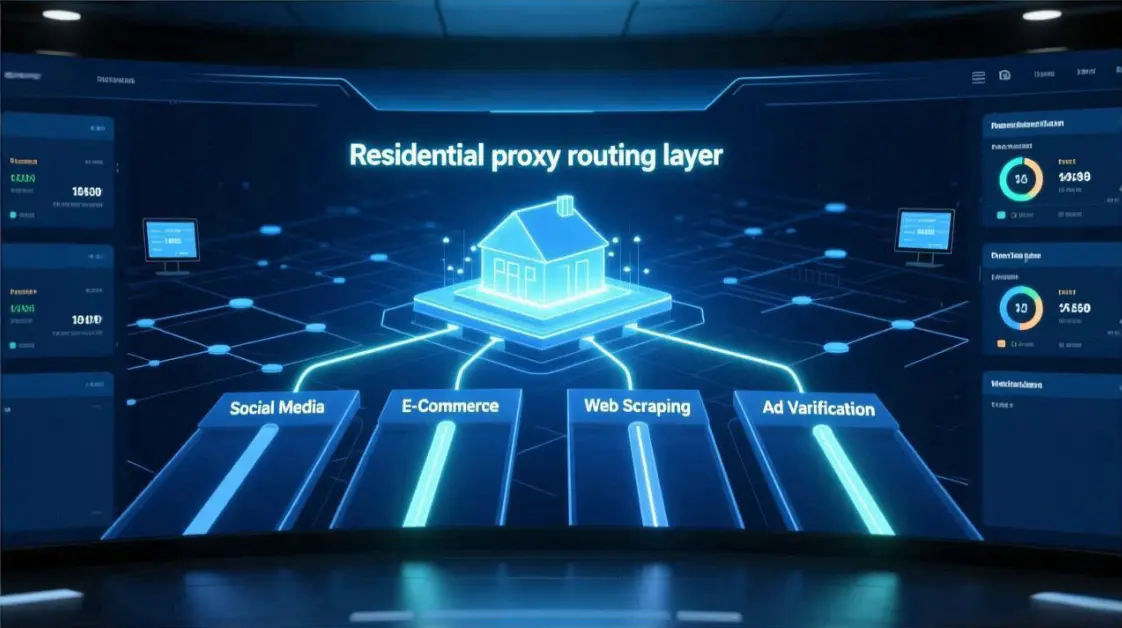
Residential proxies are the expensive part of any proxy budget.
They promise “real home users”, higher trust, and safer multi-account activity.
But once teams start buying them, the same questions always appear:
Do we really need residential? How much is enough? Why are bans still happening?
This guide is written for teams already using or seriously considering residential proxies.
E-commerce operators, social media matrices, data collection teams, and ad verification squads.
We will focus on what residential proxies actually do, how platforms see them, and where they are truly required — and how a well-structured residential proxy network fits into your overall routing strategy.
1. What residential proxies really are (and how they differ from datacenter IPs)
A residential proxy is an IP address that belongs to a consumer internet access range.
Think home broadband, fiber to the home, or small business lines behind a typical router.
Datacenter proxies come from hosting providers, cloud platforms, or bare-metal servers.
The IP ranges are well known, heavily scanned, and often tagged as “infrastructure” by platforms.
Residential proxy networks sit in between real users and your workflows.
Your traffic is routed through devices or ISP ranges that look like normal household connections.
From the platform’s perspective, a residential IP suggests a person using a browser at home.
A datacenter IP suggests an automated process, scraper, or bot running in a server rack.
That difference in “who this looks like” is the core reason why teams pay more for residential proxies.
Not because the traffic is magic, but because the identity behind the IP appears more human.
2. IP source and behavior: how platforms actually see residential traffic
Platforms do not see your proxy dashboard; they see signals.
Source ASN, IP reputation, historical abuse records, and behavior over time.
Residential proxy networks may come from:
- Pure residential P2P or device-based sources.
- ISP-allocated ranges that still look like home access.
- Hybrid networks mixing residential, ISP, and small business lines.
For each IP, platforms watch:
- Session continuity: does this IP return for similar tasks over days or weeks?
- Activity volume: does traffic look like one household, or a hundred accounts at once?
- Fingerprint consistency: browser, device, timezone, and language staying coherent?
- Cross-account overlap: how many accounts share the same IP window or pattern?
A “good” residential proxy network keeps behavior close to plausible human usage.
It spreads sessions, manages rotations, and avoids turning one household IP into a datacenter.
A “noisy” residential proxy network feels like a bot farm hidden behind home IP ranges.
The ASN may be residential, but the behavior screams automation and abuse to the platform.
3. Protection dimensions: bans, trust, and cost
Residential proxies are often treated like a shield against bans.
In reality, they change the risk profile, not remove it.
Think in three dimensions:
- Ban model
Platforms flag clusters of unusual behavior.
Residential IPs can delay suspicion because they start from a more trusted bucket. - Trust building
Stable residential routes let accounts age quietly.
Repeated logins from the same clean subnet support long-term trust signals. - Cost curve
Residential traffic is priced per GB, per port, or via access plans.
The more “human-like” you want the routing to be, the more budget you usually commit.
Residential proxies help when your workflow is identity-sensitive.
Multi-account login, payment, ads, and long-lived sessions benefit from that higher trust base.
They help less when you treat them like cheap rotating IPs for blind scraping.
At that point, you are paying residential prices for datacenter-style usage and risk.
4. Static vs rotating residential proxies: roles and trade-offs
Most residential proxy providers offer two main modes: static and rotating.
You should treat them as different tools, not just different price points.
4.1 Static residential proxies
Static residential proxies for long-lived logins give you long-lived IPs on residential or ISP ranges.
You keep the same IP for weeks or months, depending on the plan and pool.
Best suited for:
- Account creation and first login flows.
- Daily store or page management from stable devices.
- Payment, billing profile, or business manager operations.
- High-trust customer support sessions and dispute handling.
The goal is to let each account “live” behind one consistent identity route.
Device fingerprint, browser profile, and static residential IP all align over time.
Static residential is usually more expensive per IP, but cheaper per resolved incident.
Each avoided verification loop or frozen payout often justifies the extra cost.
4.2 Rotating residential proxies
Rotating residential proxies for data and monitoring change IPs automatically based on a timer or session.
They draw from a large residential proxy network, assigning new IPs as you browse or scrape.
Best suited for:
- Web scraping and price monitoring across many pages.
- Inventory checks, competitor monitoring, and content sampling.
- Ad verification and creative checks across locations.
- A/B testing landing pages or funnels at scale.
Here, the value is spread: you avoid hammering a single IP with heavy traffic.
The rotation pattern reduces rate-limit triggers and distributes risk across the pool.
When teams need aggressive coverage, they often consider the strategy in unlimited rotating residential proxy plans.
In those setups, volume rather than identity is the primary concern.
4.3 “If you only buy one type, what goes wrong?”
If you only buy static residential proxies, you risk burning expensive IPs on scraping.
Heavy crawling from a static IP quickly creates a noisy behavioral profile.
If you only buy rotating residential proxies, identity work becomes fragile.
Login sessions jump between IPs, triggering extra verification and association flags.
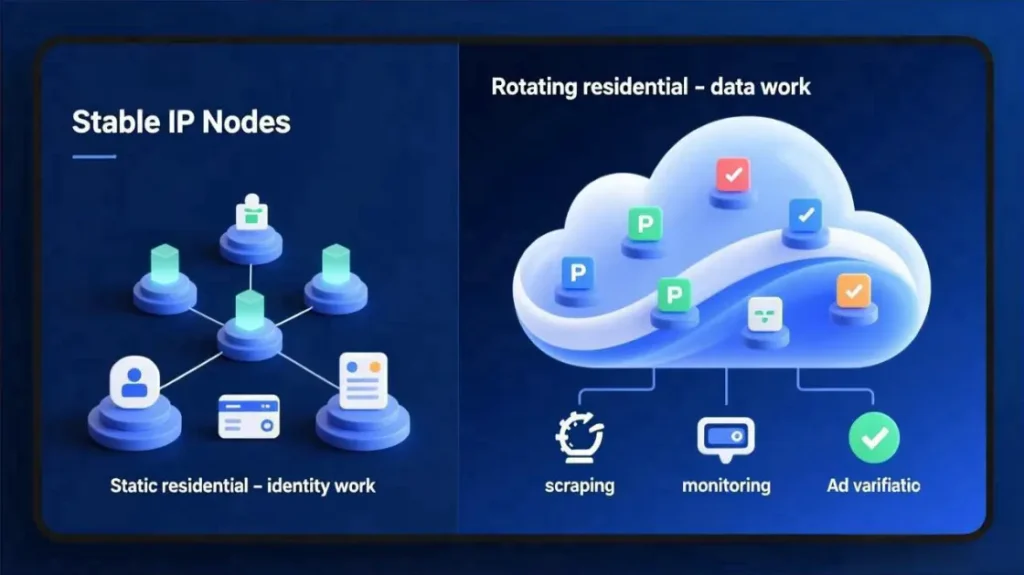
Healthy setups separate “identity work” from “data work”.
Static residential proxies carry logins and payments; rotating pools cover scraping and sampling.
5. Residential vs ISP vs mobile: where each one fits
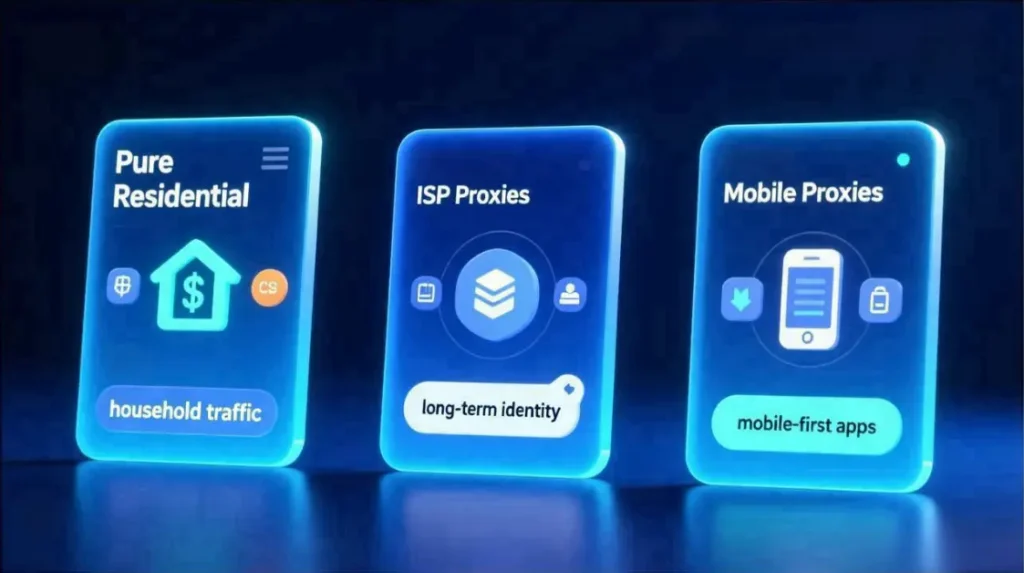
Within “residential-like” solutions, three main families matter: pure residential, ISP, and mobile.
Each plays a different role in your routing strategy.
5.1 Pure residential proxies
Pure residential proxies are sourced directly from consumer internet access lines.
They usually have the most “normal” behavior profile, but can be more volatile in uptime.
Advantages:
- Very natural IP reputation.
- Strong fit for household-style activity patterns.
Trade-offs:
- Less control over exact IP lifespan.
- More dependence on end-user connectivity stability.
5.2 ISP proxies (static residential IPs)
ISP proxies are static IPs allocated directly by internet service providers.
They sit in residential or small business ranges, but behave like rented infrastructure.
Advantages:
- High uptime and predictable routing.
- Strong fit for long-term identity, logins, and payment flows.
Trade-offs:
- Higher cost per IP compared to standard datacenter ranges.
- Still subject to profiling if overloaded with automation traffic.
Many teams treat ISP proxies as the “anchor” layer for sensitive accounts.
They combine ISP static IPs with a broader residential proxy network around them.
5.3 Mobile proxies
Mobile proxies route through 4G or 5G carrier networks.
They inherit the reputation of mobile users and carrier-grade NAT behavior.
Advantages:
- Extremely robust in some regions where mobile traffic dominates.
- Good for app-heavy workflows or mobile-only platforms.
Risks:
- Overusing a single mobile route can look like a huge device cluster.
- Fast, aggressive rotations may trigger fraud models faster than desktop flows.
Mobile proxies are powerful, but should not be the default for every task.
They are a specialized tool for mobile-centric flows, not a universal shield.
6. Which workflows really need residential IPs?
Not every task deserves residential cost and complexity.
The smart question is “which workflows break quickly without resi?”
6.1 Social media and e-commerce multi-account workflows
Account groups for TikTok, Facebook, Instagram, Shopee, or Amazon share one pattern.
You care less about raw volume, and more about identity stability over time.
For these flows, you usually need:
- Static residential or ISP IPs for core accounts.
- Clear mapping between profiles, devices, and proxy segments.
- A routing model designed for stable social media proxy routing.
Rotating residential proxies can still appear, but carefully segmented.
For example, short-term testing profiles or non-critical browsing sessions.
The key is that “real work” happens on stable routes, not random rotations.
Customer chats, order handling, and ad management all run on consistent IPs.
For operators, this is where residential IPs for multi-account workflows start to show concrete value: stable identity, reduced association flags, and quieter verification patterns.
6.2 Web scraping, monitoring, and ad verification
Here, the proxy is part of a data collection pipeline.
You care about coverage, freshness, and avoiding blocks at scale.
Residential IPs help when:
- Target sites are hostile to datacenter IPs.
- You need localized views that match real users closely.
- Ad platforms serve different creatives or prices to residential traffic.
Rotating residential proxies are usually the default for these workflows.
Static residential or ISP IPs may cover smaller, high-value monitors.
If your stack leans heavily on volume, treat an unlimited rotating residential proxy lane as a separate, data-focused channel in your stack, isolated from long-lived account logins.
6.3 VPN-style browsing vs real workflow routing
Many teams start by thinking “we just need a VPN with residential IPs”.
They log in manually and assume traffic will stay safe.
The problem: a single VPN-style exit can carry dozens of unrelated tasks.
Different accounts, operators, and devices all share the same exit without structure.
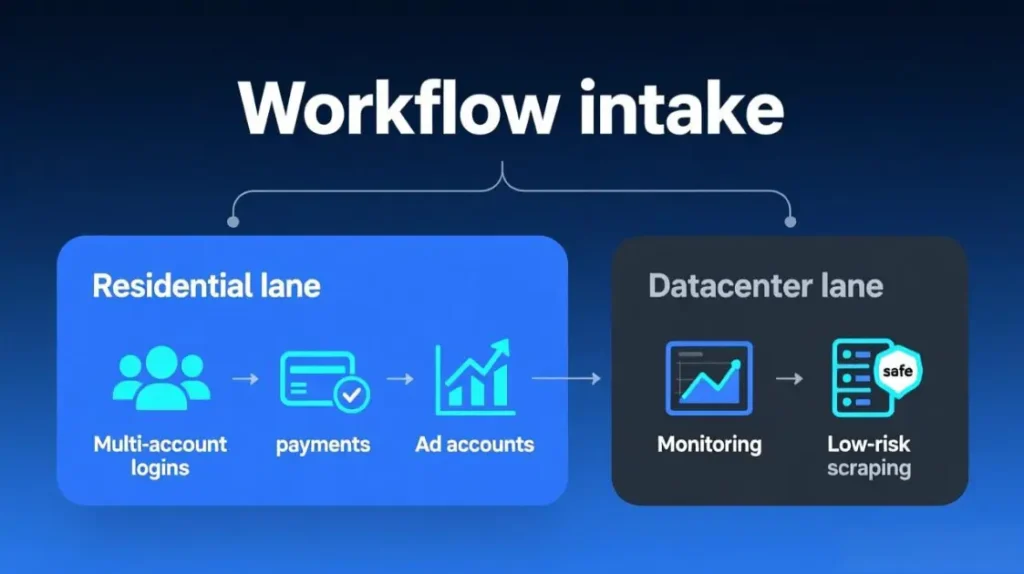
A better model treats residential proxies as part of a workflow routing layer.
Each workflow gets its own lanes, rules, and proxy segments.
If you are deciding which workflows need resi at all, go deeper with where proxy IPs actually matter.
It helps separate “must be residential” tasks from “good enough with datacenter”.
7. Building a combined stack: residential plus other proxy types
In practice, most teams do not run “residential only” setups.
They mix residential, ISP, datacenter, and sometimes mobile, by task type.
7.1 A simple pattern for individuals
For solo operators or very small groups:
- 1–3 static residential or ISP IPs for their main accounts.
- A small rotating residential pool for light monitoring and checks.
- One datacenter or regular VPN route for generic browsing and research.
The target is low entropy.
Each main account knows only one or two IP stories over months.
A concrete starting example:
- 1 static/ISP IP bound to your primary store or main profile.
- 1 static/ISP IP for backup or a second brand.
- 1 small rotating residential pool on country-level for price checks and competitor research.
- 1 datacenter proxy or VPN for tooling, documentation, and non-account work.
7.2 A pattern for small teams
For small teams running five to twenty accounts or properties:
- A residential IP segment for multi-account workflows and core logins.
- A distinct rotating residential pool for scraping or sampling.
- Datacenter proxies for internal tools, dashboards, and back-office tasks.
At this size, you start to define proxy “pools” by brand, region, or operator.
MaskProxy-style routing setups often map each team bucket to its own proxy segment.
Example for a Shopee / Lazada / Amazon team:
- Per operator: 2–4 static residential or ISP IPs dedicated to their store group.
- Per region: 1 rotating residential pool for catalog and price monitoring.
- Shared: 1 datacenter pool for ERP, BI, and internal admin tools.
7.3 A pattern for larger operations
For larger teams or agencies:
- ISP proxies anchoring high-value accounts and long-term identities.
- Static residential proxies for regional account clusters or client groups.
- Multiple rotating residential pools tuned for different sites or workloads.
- Datacenter pools for high-volume, low-sensitivity automation.
- Mobile proxies reserved for mobile-only or app-heavy workflows.
The stack becomes a routing fabric instead of a simple proxy list.
Your main challenge shifts from “which proxy type” to “which workflow belongs where”.
A typical structure:
- Identity tier: ISP + static residential, strictly mapped to stores, brands, or clients.
- Data tier: rotating residential pools per geo / platform, with one unlimited rotating residential proxies for high-volume workloads lane if volume demands it.
- Utility tier: datacenter & VPN routes for tools, updates, internal collaboration.
- Mobile tier: mobile proxies only where the product is mobile-first or mobile-only.

7.4 How to upgrade your stack as you grow
You do not need everything on day one. A simple progression works better:
- Start with datacenter + a few residential IPs
- One stable residential or ISP IP for your most critical account.
- Datacenter routes for non-critical workflows.
- Add static residential / ISP when incidents repeat
- If you see recurring verifications or account freezes on core properties,
promote those accounts to dedicated static or ISP residential lanes.
- If you see recurring verifications or account freezes on core properties,
- Add rotating residential or unlimited lanes when volume hits limits
- When scraping, monitoring, or ad verification starts to hit rate limits on DC,
move that data traffic to rotating residential, and keep logins elsewhere.
- When scraping, monitoring, or ad verification starts to hit rate limits on DC,
- Only then consider mobile
- Add mobile proxies when platforms or products are clearly mobile-biased.
This keeps budget aligned with real risk: you buy just enough residential for your current workflows, and expand the stack only when patterns show you where it pays off.
8. Common mistakes and risk reminders
There are a few patterns that repeatedly cause trouble, even with expensive residential proxies.
8.1 Believing “residential = safe, no matter what”
Residential IPs start with higher trust, but behavior still dominates.
Aggressive multi-login, rushed scale-up, or chaotic rotation will still trigger bans.
Treat residential proxies as a better starting point, not protection from bad strategy.
8.2 Mixing VPNs, public proxies, and residential without a plan
Some teams log in once through residential, then casually use VPNs or public proxies later.
From the platform’s view, the identity jumps between completely different environments.
This breaks the “quiet, stable household” story your residential IPs are trying to tell.
Keep identity work on one clean routing lane; move experiments to clearly separate lanes.
8.3 Throwing every task into a single rotating pool
It is tempting to put logins, scraping, and verification into one big rotating residential pool.
That usually produces noisy, inconsistent identity signals for each account.
Instead:
- Use static or ISP routes for core identity work.
- Use rotating residential pools for heavy data and monitoring tasks.
- Keep workflows and operators mapped to specific pools and prefixes.
Routing discipline often matters more than the headline proxy type.
9. From buying residential proxies to designing routing
Residential proxies are not just another line item in your tool stack.
They are part of how platforms understand your accounts, sessions, and workflows.
Once you start thinking in routes instead of single IPs, decisions become clearer:
- Which workflows truly need residential, and which do not.
- Where static or ISP residential IPs should anchor identity.
- Where rotating residential proxies should carry data work instead.
From there, you can layer in more advanced routing concepts:
- Per-workflow proxy pools with strict boundaries.
- Region-bound routing for social media matrices and brand operations.
- Tiered stacks combining residential, ISP, datacenter, and mobile.
If you are planning social or content matrices, dive deeper into the stable social media proxy routing approach described in the dedicated article.
If you are mapping your entire stack, revisit the “Where Proxy IPs Actually Matter in Modern Workflows” article to prioritize spend.
And if rotating residential volume is your bottleneck, treat an unlimited rotating residential proxy lane as a separate, data-focused channel in your architecture, not as a shared path for logins and identity work.
Residential proxies pay off when they are treated as a routing layer, not a magic checkbox.
Once that mindset shifts, budgets, risk, and performance all become much easier to control.
FAQ: Residential proxies in real workflows
Q1: Do I always need residential proxies for multi-account setups?
No. Residential proxies are most valuable when accounts are sensitive (stores, ad accounts, payment profiles) and bans are costly. For low-value tests or temporary accounts, datacenter proxies may be “good enough” if platforms are not aggressively blocking them.
Q2: Are ISP proxies better than pure residential IPs?
Neither is universally “better”. ISP proxies behave like stable, leased residential lines and are ideal for long-term identities. Pure residential IPs can look more like normal households but may be less controllable. Many teams use ISP as the anchor for important accounts and pure residential or rotating pools around them.
Q3: When are datacenter proxies good enough instead of residential?
Datacenter proxies are usually fine for:
– Internal tools, dashboards, and back-office apps.
– Low-risk browsing and research.
– Early testing on non-critical accounts.
If the platform does not aggressively filter DC ranges, starting with datacenter and promoting only proven workflows to residential saves budget.
Q4: How many residential IPs should a small team start with?
As a rule of thumb:
– 1–3 static or ISP residential IPs for the most important accounts or store groups.
– 1 small rotating residential pool if you scrape or monitor data regularly.
– Datacenter routes for everything else.
You can add more static IPs only when new accounts prove they generate value and need long-term stability.
Q5: Should I mix VPNs with residential proxies?
Mixing generic VPN exits and residential proxies on the same accounts is risky. It creates conflicting identity stories: some logins look like home users, others like random VPN infrastructure. Keep core identity work on consistent residential or ISP routes, and reserve VPNs for generic research and non-account tasks.
Q6: Can I safely put all tasks into one rotating residential pool?
Technically you can, but it is one of the fastest ways to confuse platform risk models. Logins, scraping, and verification traffic will all share the same “behavioral footprint”. Instead, separate pools by task type: identity, data, and utilities, with clear mapping between accounts, operators, and proxy segments.