What Is a Residential Proxy? How It Works & How to Choose
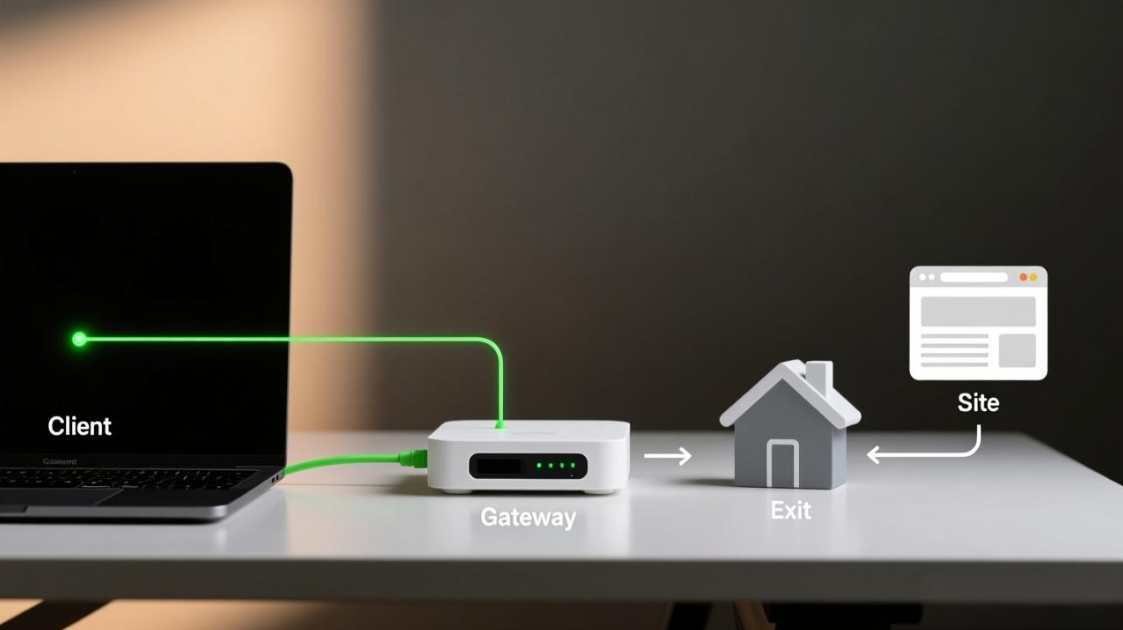
A residential proxy server routes your traffic through a residential IP address assigned by an ISP to a consumer A residential proxy routes your traffic through a home IP address assigned by an ISP. To the site you visit, the request looks like it comes from a normal household connection, not from your office network or a datacenter IP range.
Use a residential proxy when a task needs a steady “where you’re coming from” signal during login, repeated actions, or location-based checks. Skip it when the task is simple, price-sensitive, and doesn’t trigger strict checks—datacenter routes are often enough.
What you’ll get here:
- A simple definition and how it differs from datacenter and ISP routes
- The request path, step by step
- Rotating vs sticky vs static, with a quick selection table
- Residential vs datacenter vs ISP, with a comparison table
- A checklist that prevents the most common failures
Many teams start with a rotating setup when they need a bigger pool and smoother distribution of requests; that’s the core idea behind rotating residential proxies.
MaskProxy is a proxy infrastructure provider, but results still depend on choosing the right type and matching session settings to the task.
What Is a Residential IP?
A residential IP is an IP address given out by an ISP to consumer internet connections. Think of it as the “network address” that many websites associate with normal home internet usage.
In practice, the key point is classification: some sites treat home ISP ranges differently from hosting/datacenter ranges. That doesn’t mean “never blocked,” but it changes how traffic is recognized.
How a Residential Proxy Works
A residential proxy sits between your device and the site you’re trying to reach. The site receives the request, but it sees the residential exit IP as the source.
At the gateway layer, a proxy typically accepts the client connection and creates a new, separate connection to the origin server, which is the core behavior described in how a proxy accepts a connection and establishes a new connection to the origin.
- Your app creates a request (browser, script, tool, API client).
- You send it to a proxy gateway (with user/pass, token, or IP allowlist).
- The gateway picks an exit IP based on your rules (country/city/ISP) and your session choice.
- The exit IP sends the request to the destination and receives the response.
- The response comes back to you; with a sticky session, multiple requests reuse the same exit IP for a set time window.

What this changes in everyday use:
- Fewer mid-task “suspicious login” moments when the exit IP stays the same
- More consistent location results when you keep one region
- Less single-IP pressure when requests are spread across a pool
Two settings decide whether results feel stable:
- Sticky session: whether requests keep the same exit IP for a while
- Rotation: when the exit IP changes (time-based, request-based, or manual)
If something goes wrong, start with one check: did the exit IP change in the middle of the same task?What this changes in everyday use:
- Fewer mid-task “suspicious login” moments when the exit IP stays the same
- More consistent location results when you keep one region
- Less single-IP pressure when requests are spread across a pool
Two settings decide whether results feel stable:
- Sticky session: whether requests keep the same exit IP for a while
- Rotation: when the exit IP changes (time-based, request-based, or manual)
If something goes wrong, start with one check: did the exit IP change in the middle of the same task?
Common Situations Where Residential IP Identity Helps Most
Residential proxies help most when a site reacts to location changes or repeated logins. If you’re doing a multi-step task (login → actions → logout), try to keep the same exit IP for the whole run.
- Multi-account access (social, ads, seller tools): keep one account on one steady route to reduce extra checks.
- Ad verification: check how ads show up in a specific region, without “location drifting” during the test.
- Price and availability checks: see what users in a region actually see (pricing, stock, offers).
- Geo content QA: confirm region-specific pages or content variations match expectations.
- Automation on strict sites: when simple routes get flagged quickly, stable residential exits can reduce friction.
Rotating vs Static Residential Proxies
The real question isn’t “which is better.” It’s “does the task break if the exit IP changes.”
Static residential fits continuity: logins, long sessions, repeated access from one consistent exit.
Sticky sessions sit in the middle: keep one exit IP for a set window, then rotate only when the window ends (or when you reset the session).
Rotating residential fits volume: lots of requests spread across a pool.
Quick decision table
| Type | Best fit | Strength | Trade-off | Typical sticky idea |
|---|---|---|---|---|
| Rotating residential | High-volume access patterns | Spreads load across a pool | Identity changes can break flows | Off / 1 min |
| Rotating + sticky | Multi-step flows with short stability | Balances stability + distribution | Needs tuning to avoid mid-flow swaps | 10 / 15 / 30 / 60 min |
| Static residential | Long-lived sessions and repeat access | Predictable identity | Less flexible pool behavior | Days to weeks |
If the task includes repeated logins or long sessions, static is usually the cleanest route; that’s what static residential proxies are designed for.
A simple rule: set the sticky window longer than one full task run. If the task takes 25 minutes, a 10-minute sticky window is likely to cause extra checks.
Residential vs Datacenter vs ISP
These categories describe where the IP range comes from, and that origin heavily influences how destinations treat traffic and how your proxy IP is classified.
- Datacenter: IPs come from hosting providers. Often fast and affordable, but easier to classify as automated traffic.
- Residential: IPs look like consumer connections. Often more tolerant for access control, but can be slower and costlier.
- ISP / static residential: hybrid characteristics; typically stronger continuity and often good latency, but less “pool-like” flexibility.
Comparison table
| Dimension | Residential | Datacenter | ISP / Static residential |
|---|---|---|---|
| IP origin | Consumer ISP ranges | Hosting/datacenter ranges | ISP-linked, often stable |
| Identity stability | Medium–high (depends on sessions) | High (same IP if static) | High |
| Typical latency | Medium | Low | Low–medium |
| Cost profile | Higher | Lower | Higher |
| Usual failure mode | Rotation breaks a flow | Classified/blocked sooner | Limited coverage/quantity |
| Best fit | Identity-sensitive access | Cost-sensitive access | Long-lived identity routes |
Pick based on how sensitive the task is to IP changes. If the task still works when the IP changes, datacenter is often enough. If the task breaks when the exit IP changes, focus on stability first and keep the same exit for the full run.
Protocols That Matter: HTTP vs SOCKS5
Protocols do not decide whether an IP is residential. They decide how traffic is carried and what software can use it easily.
- HTTP proxies are straightforward for web requests and tooling that speaks HTTP(S) natively.
- SOCKS5 proxies are more general-purpose for different kinds of traffic patterns and app compatibility.
In real deployments, HTTP proxy usage is often wired through standard environment variables, which is the pattern documented in configure an HTTP proxy using HTTP_PROXY and HTTPS_PROXY environment variables.
A simple default is HTTP for normal web requests, and SOCKS5 when you need wider app compatibility. Choose using these rules:
- If the tool is web-focused and easy setup matters, use HTTP.
- If the tool needs broader compatibility, use SOCKS5.
- If debugging gets messy, stick to one protocol across the whole task to reduce variables.
When you need broad client compatibility with fewer surprises, SOCKS5 proxies are a solid default.
Ethical Sourcing and Safe Usage Checks
Before using any residential IP infrastructure, check whether the provider clearly documents sourcing, consent/permission model, and enforcement rules (Terms / Acceptable Use / Abuse policy); vague wording here is a practical risk signal.
- The provider publishes a clear description of how residential IPs are sourced and governed
- An abuse policy is easy to find and explains enforcement steps in plain language
- Authentication options are explicit (user/pass, token, or IP allowlist) and easy to control
- Session behavior is documented (sticky duration, rotation triggers, and how to reset a session)
- Geo targeting rules are explicit and predictable (so routing outcomes are not ambiguous)
- Limits are stated up front (concurrency, bandwidth, or request caps)
- Basic troubleshooting signals exist (session identifiers, exit metadata, error categories)
- Support can answer routing questions with concrete configuration guidance, not generic policy text
A Practical Checklist Before You Use One
Most problems come from a mismatch: the proxy type is fine, but the session time, request pace, or parallel volume doesn’t fit the task.
Use this checklist to keep routing stable:
- Define the unit of work: how long does one complete flow take (minutes/hours/days)?
- Match sticky duration to the unit: a simple default is “flow duration + 20–30% buffer.”
- Avoid rotation mid-flow: if the flow has checkpoints, keep identity consistent across them.
- Set a conservative concurrency ceiling per route: Start with 1–3 parallel requests per session, then increase slowly only if things stay stable.
- Throttle retries with backoff: Space retries out (10–30 seconds is a safe start). Avoid tight loops.
- Keep geo rules minimal: only constrain location as much as the workflow requires.
- Separate roles: one identity route per distinct access pattern (stable steps vs burst steps).
- Log session IDs and exit info for debugging: you need to know whether an IP changed when the destination reacted.
- Treat“verification prompts” as a signal: If verification prompts increase: reduce parallel requests first, then extend the sticky window, then slow retries—change one thing at a time.
- Test with a small slice first: validate stability before scaling volume.
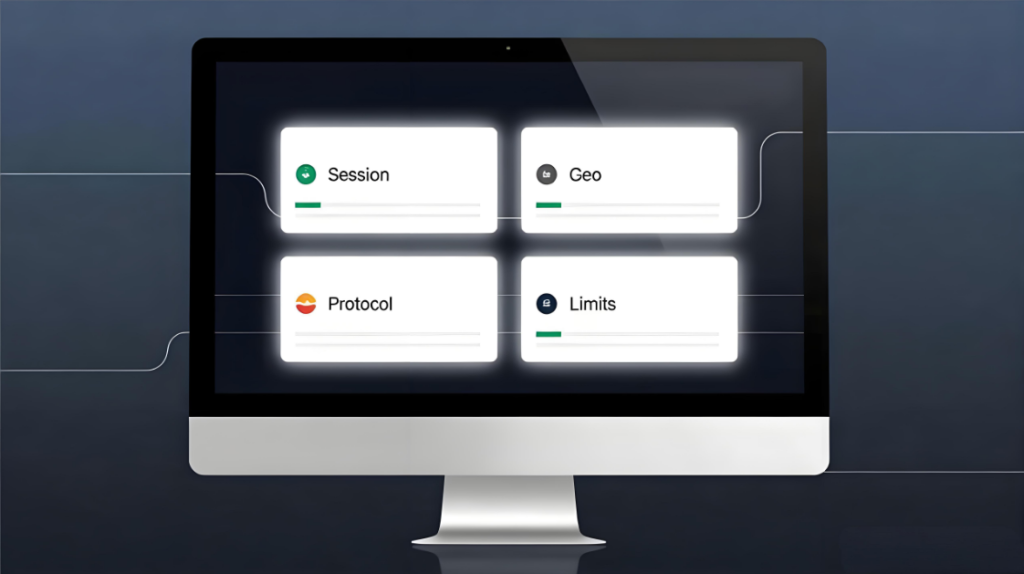
In MaskProxy dashboards (and most proxy control panels), the fields that matter most are session controls, geo targeting, and protocol selection—those three usually explain most stability outcomes.
Common Mistakes That Cause Unstable Results
Sticky too short
A 5–10 minute sticky window can be perfect for short flows and terrible for longer ones. If the identity swaps mid-step, access control often escalates.
Mixing identity needs inside one route
A single route used for both stable steps and burst steps creates inconsistent behavior. Keep those patterns separate.
Assuming “residential” means “never blocked”
Residential origin reduces certain classifications, but cadence, concurrency, and repeated retries still trigger controls.
Over-constraining geo
Pinning to a narrow city/ISP slice can reduce available exits, causing repeated reuse and higher collision risk. Constrain only what the workflow truly requires.
A residential proxy is mainly a way to keep location and “where you come from” consistent when a task needs it. Choose the type based on stability needs, then set session timing so the exit IP doesn’t switch mid-task.
If rotation strategy and pool size are the main constraints, unlimited rotating residential proxy plans are one way teams scale while keeping session behavior controllable.
MaskProxy can support the routing patterns described here, but stability still depends on the type you choose, session timing, and how fast you send requests.

Daniel Harris is a Content Manager and Full-Stack SEO Specialist with 7+ years of hands-on experience across content strategy and technical SEO. He writes about proxy usage in everyday workflows, including SEO checks, ad previews, pricing scans, and multi-account work. He’s drawn to systems that stay consistent over time and writing that stays calm, concrete, and readable. Outside work, Daniel is usually exploring new tools, outlining future pieces, or getting lost in a long book.
FAQ
Is a residential proxy the same as a VPN?
No. A VPN is typically a single tunnel endpoint you connect to; a residential proxy is a request-level routing layer where the exit identity can be selected and managed via sessions and policies.
Why can residential proxies be slower sometimes?
Residential exits may have more variable last-mile performance than datacenter routes. The stability settings you choose can also trade flexibility for consistency.
What’s the difference between rotating and sticky sessions?
Rotating changes the exit identity across requests based on a policy. Sticky keeps the same exit identity for a time window, then rotates after the window ends (or when you reset it).
When is a datacenter proxy “good enough”?
When the workflow does not rely on a consumer-looking network identity, and access controls are not strict. Cost-sensitive, throughput-heavy tasks often start here.
How many IPs should a small team start with?
Start with enough identity routes to separate distinct workflows. If two flows must never share identity signals, treat them as separate routes, then scale pools only after stability is proven.
What should you check first if verification prompts increase?
Check whether the exit identity changed mid-flow, whether concurrency spiked, and whether retries are firing too quickly. Stability tuning usually beats adding volume as a response.