
 Rotating Residential Proxies
 Rotating Datacenter Proxies
 Static Residential Proxies
 Static Datacenter Proxies
 Unlimited Rotating Residential Proxies
 Proxy Solutions
 United States Proxies
 Canada Proxies
 United Kingdom Proxies
 France Proxies
 Germany Proxies
 Singapore Proxies
 Japan Proxies
 Australia Proxies
 Vietnam Proxies
 Philippines Proxies
 India Proxies
 Mexico Proxies
 View All Regions
 Social Media
 E-commerce
 Data Aggregation
 Ad Verification
 Artificial Intelligence
 Market Research
 Integration Tools
 Contact Us
 FAQ
FAQ
 Documentation
 Tutorials
 SDK
SDK
 Affiliate Program
 Become an Agent
 Partners
 Blog
Blog


How to Use Residential Proxies: Setup, Routing, Troubleshooting, Compliance

Residential proxies are rarely purchased for “privacy.” Teams buy them to increase success rates on tasks that break when traffic looks automated: localized checks, high-friction scraping, ad verification, and account workflows. The difference between “it works” and “we’re still blocked” is almost never the proxy type alone—it’s how you design sessions, rotation, concurrency, retries, and governance around it.
This guide is for procurement, growth, data teams, scraping engineers, and operators who need a repeatable playbook. MaskProxy is typically deployed as a segmented routing layer rather than a one-size-fits-all proxy switch.
What Residential Proxies Do and Don’t Do
A residential proxy changes the network identity a target sees: your public IP and the network signals associated with it (ASN/ISP, coarse geo, reputation signals). It does not automatically solve the other two buckets that trigger blocks:
- Client identity: cookies, TLS and browser fingerprinting, headers, automation artifacts
- Behavior: request rhythm, concurrency, retries, navigation depth, and correlation across accounts
Residential routing is strongest when network origin realism is the missing piece. If your failures are mainly rate limiting, cookie churn, retry storms, or bot-like automation, you can still fail with a premium pool.
When a workflow truly needs household-like origins and broad coverage, Residential Proxies are a practical foundation.
Choose the Right Proxy Type Without Overspending
Many teams default to rotating residential IPs and later realize a large share of traffic could have been cheaper and faster. The decision is not “residential or not,” but which proxy type for which workflow.
A simple budget-friendly pattern is “two lanes”:
- Lane A (identity-sensitive): long-lived logins, multi-step flows, repeated account actions
- Lane B (collection-heavy): independent page fetches, monitoring, broad geo checks
For the collection lane, Datacenter Proxies can be “good enough” when targets are moderate-security and your throttling is disciplined.
Proxy selection matrix
| Workflow examples | Suggested category | Routing mode | Why it works | Typical failure if misused |
|---|---|---|---|---|
| Multi-step login, checkout, account creation | Residential / ISP-style static | Sticky sessions | Session continuity matters more than rotation | IP changes mid-flow trigger re-verification |
| Geo-specific SERP and ad checks across regions | Residential | Rotating or short sticky | Broad coverage reduces correlation | Bandwidth waste on heavy pages |
| Price monitoring at scale on moderate targets | Datacenter / ISP-style | Rotating | Cost-efficient volume | Correlated bans if reputation is weak |
| Social workflows with repeated logins | Residential / ISP-style static | Sticky sessions | Stable origin reduces trust resets | Shadowban/review loops if accounts share origins |
| High-friction data collection on strict targets | Residential | Rotating + controlled concurrency | Diversity reduces correlation | 429/challenges if rate is aggressive |
Procurement rule of thumb: optimize for cost per successful page/action, not price per GB. “Cheaper per GB” can still be more expensive if it creates retries and heavier rendered pages.
Verify Your Proxy Is Actually Working
Before you debug blocks, prove routing is real. Many failures are simply proxy not applied, wrong auth, or a request bypassing the proxy.
Step 1 — Minimal curl verification
curl -i \
  --proxy "http://USERNAME:PASSWORD@PROXY_HOST:PORT" \
  https://cloudflare.com/cdn-cgi/trace
Validate three things:
- IP changed (not your local egress)
- Geo roughly matches what you requested
- Latency is stable enough for your workflow
If you still see your real IP, stop and fix routing first.
Step 2 — Standardize protocol to avoid silent mismatch
A lot of “random timeouts” are protocol mismatch and tool inconsistency. Standardize one default and document it internally; Proxy Protocols is a clean place to anchor that standard.
For socket-heavy tools or apps that behave better with SOCKS semantics, SOCKS5 Proxies are a common choice.
Implement Proxies in Code and Browsers
This section is intentionally copyable. Start here, then customize session design and concurrency.
Recipe A — Python requests with disciplined retries
Official reference for proxy configuration in Requests: Requests “Proxies” documentation.
import time
import random
import requests

PROXY = "http://USERNAME:PASSWORD@PROXY_HOST:PORT"
PROXIES = {"http": PROXY, "https": PROXY}

def sleep_jitter(base: float) -> None:
    time.sleep(base + random.uniform(0, base * 0.3))

def get_with_backoff(url: str, headers: dict, max_tries: int = 6):
    backoff = 1.0
    for _ in range(max_tries):
        resp = requests.get(
            url,
            headers=headers,
            proxies=PROXIES,
            timeout=(10, 30),
            allow_redirects=True
        )

        # 429: obey Retry-After when present, otherwise exponential backoff + jitter
        if resp.status_code == 429:
            ra = resp.headers.get("Retry-After")
            if ra and ra.isdigit():
                time.sleep(int(ra))
            else:
                sleep_jitter(backoff)
                backoff = min(backoff * 2.0, 30.0)
            continue

        # transient 5xx
        if resp.status_code in (500, 502, 503, 504):
            sleep_jitter(backoff)
            backoff = min(backoff * 1.8, 30.0)
            continue

        return resp

    return resp

headers = {"User-Agent": "Mozilla/5.0"}
resp = get_with_backoff("https://example.com/", headers)
print(resp.status_code, resp.text[:200])
Key point: the goal is to slow down under pressure (429/5xx), not to “brute-force success.”
Recipe B — Playwright proxy configuration
Official reference: Playwright Network documentation.
import { chromium } from "playwright";

(async () => {
  const browser = await chromium.launch({
    proxy: {
      server: "http://PROXY_HOST:PORT",
      username: "USERNAME",
      password: "PASSWORD",
    },
    headless: true,
  });

  const context = await browser.newContext({
    userAgent: "Mozilla/5.0",
    viewport: { width: 1366, height: 768 },
  });

  const page = await context.newPage();
  await page.goto("https://example.com/", { waitUntil: "domcontentloaded", timeout: 60000 });
  console.log(await page.title());

  await browser.close();
})();
Stability tip: login flows usually become stable when you move them onto sticky sessions + isolated pools, not when you add more rotation.
For identity-sensitive workflows that need stable origin over time, Static Residential Proxies are often a pragmatic fit.
Recipe C — Geo consistency smoke test
for i in $(seq 1 5); do
  curl -s --proxy "http://USERNAME:PASSWORD@PROXY_HOST:PORT" https://cloudflare.com/cdn-cgi/trace | grep -E "ip=|loc="
  sleep 1
done
Rotation vs Sticky Sessions: Routing Rules That Hold Up
Rotation is not a feature you “enable.” It’s a strategy you apply to the right task category.
Use sticky sessions when:
- A workflow spans multiple requests with shared cookies
- You need stable identity across login or checkout
- Targets apply step-wise risk scoring where identity changes are suspicious
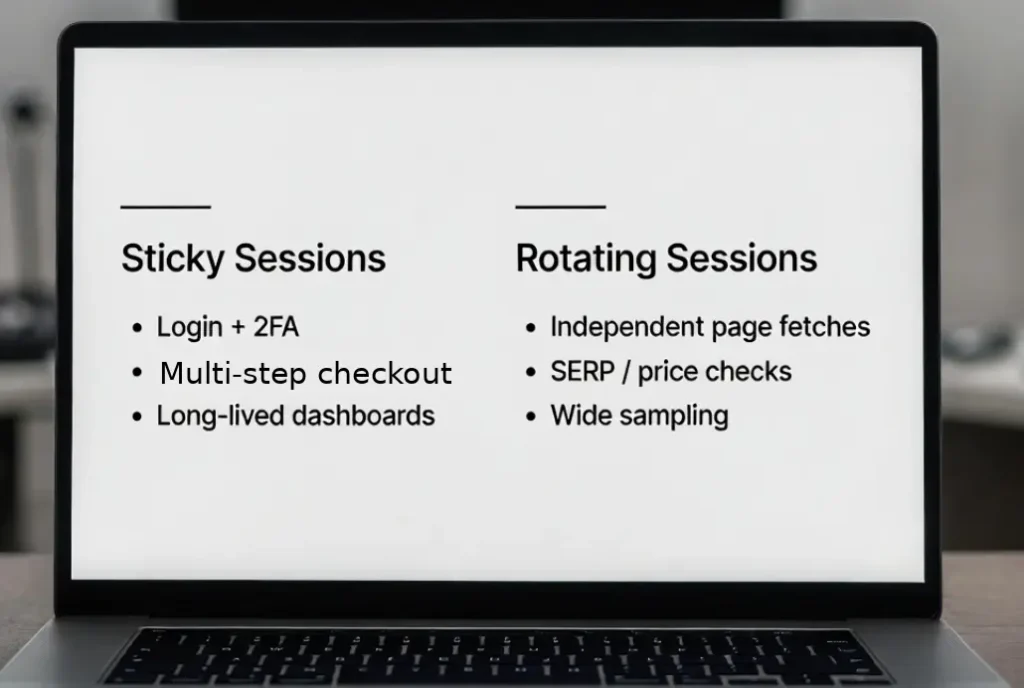
Use rotating sessions when:
- You fetch many independent pages
- You collect across many locales
- You want to reduce correlation across requests
A team rule that prevents most “mystery failures”:
- Identity workflows use sticky sessions with dedicated pools
- Collection workflows use rotating sessions with controlled concurrency
- Pools are segmented by target category so risk does not bleed across workflows
When you need large diversity for collection workloads, Rotating Residential Proxies are commonly used for that lane.
Troubleshoot Blocks and Errors Systematically
When teams say “we are blocked,” they often mix different failure classes:
- 429: rate limiting and policy windows
- 403: access denied and trust signals
- Challenge pages/CAPTCHAs: behavior + fingerprinting + reputation
- Timeouts/5xx bursts: upstream instability or overload
Authoritative references for these behaviors:
Troubleshooting matrix
| Symptom | Common signal | Quick validation | Likely cause | Fix that usually works |
|---|---|---|---|---|
| 407 Proxy Authentication Required | 407 status | curl with explicit proxy auth | Wrong credentials / format | Fix auth format, standardize protocol, avoid env proxy conflicts |
| 429 Too Many Requests | 429 (+ Retry-After sometimes) | log Retry-After, reduce concurrency | Rate window exceeded | Backoff + jitter, respect Retry-After, cache/dedupe |
| 403 Access Denied | 403 without retry guidance | compare across pools | Reputation/fingerprint mismatch | Reduce correlation, isolate workflows, slow down |
| CAPTCHA / challenge page | interstitial markers | headed vs headless compare | Automation/behavior signals | Stable sessions, human-like pacing, fewer jumps |
| Geo mismatch | trace shows wrong loc | multi-sample loop | Geo routing not applied | Canary checks, separate region pools |
| Frequent session resets | unexpected logouts | force sticky route | IP changed mid-session | Sticky sessions + dedicated identity pool |
| Timeouts / 5xx spikes | 502/503 bursts | lower concurrency | Upstream overload | Circuit breaker, retry caps, fallback pool |
Measure Success Rate and Cost Per Success
If you want repeatable success and predictable cost, define shared KPIs:
- Success rate: successful responses per attempts
- Challenge rate: percent CAPTCHA/interstitial
- Cost per success: spend divided by successful pages/actions
- Median latency: split identity lane vs collection lane
- Error mix: 407/429/403/timeouts
Three cost controls that consistently move the needle:
- Cap concurrency before you buy more bandwidth
- Deduplicate/caching to reduce payload waste
- Avoid retry storms by honoring Retry-After and using jitter
MaskProxy typically fits best when you enforce these policies centrally and keep identity and collection lanes isolated.

Compliance and Governance Essentials
A compliant program starts with clear policy and operational controls:
- Define allowed targets and permitted data fields
- Respect rate limits and avoid retry storms
- Keep audit logs minimal and access-controlled
- Document how proxy credentials are issued and rotated
Authoritative reference for robots.txt:
The key takeaway is robots directives are not access authorization. Treat them as governance input, not permission.

Daniel Harris is a Content Manager and Full-Stack SEO Specialist with 7+ years of hands-on experience across content strategy and technical SEO. He writes about proxy usage in everyday workflows, including SEO checks, ad previews, pricing scans, and multi-account work. He’s drawn to systems that stay consistent over time and writing that stays calm, concrete, and readable. Outside work, Daniel is usually exploring new tools, outlining future pieces, or getting lost in a long book.
FAQ
1. Do residential proxies always prevent blocks?
No. They improve network origin realism, but rate limiting, fingerprinting, and behavior still matter.
2. When are datacenter routes good enough?
When targets are moderate-security and your workflow is high volume with low identity sensitivity.
3. What’s the difference between rotating IPs and sticky sessions?
Rotating spreads requests across many origins; sticky keeps one origin long enough to complete multi-step flows.
4. How do I verify my proxy is actually working?
How do I verify my proxy is actually working?
5. Why am I getting 407?
Usually credentials/auth format, or the proxy not being applied consistently across requests.
6. How should I handle 429 properly?
Reduce concurrency, add backoff and jitter, and respect Retry-After when present.
7. Is city-level geotargeting worth the cost?
Only when the decision truly depends on city-level variance (localized SERP/ads/content).
8. How many IPs do I need to start with?
Size by concurrency first, then scale based on success and challenge rates.
9. Can I use residential routes for multi-account logins safely?
Safety increases with routing isolation and stable sessions; it drops when accounts share origins and behavior patterns.
10. What should procurement ask a proxy provider?
Sourcing model, geo accuracy, refresh behavior, protocol support, concurrency limits, SLAs, and auditability.