Mexico Proxy Buying Guide 2026: Choose, Set Up, and Troubleshoot

If you’re shopping for a Mexico proxy, you probably don’t want a networking class. You want answers like:
- Which type should I buy for my use case like e-commerce admin logins, ad verification, price monitoring, or localized content testing?
- How do I avoid “cheap Mexico IPs” that look fine on an IP checker but trigger CAPTCHAs the moment I log in?
- How do I set it up today in a browser or tool?
- If something fails—slow speed, wrong city, login verification loops—what should I do next?
This guide is written like a friend who’s done the buying and debugging before. You’ll get a simple decision framework, a plain-English comparison table, pricing models explained, a copy-paste pre-purchase checklist, and a practical troubleshooting flow.
A consistent baseline helps when you compare plan labels and features across providers, so you can sanity-check terminology and options against a real Mexico product catalog like Mexico proxy options.
What is a Mexico proxy
A proxy is a middleman connection: websites see the proxy’s IP address instead of yours.
A “Mexico proxy” means that middleman appears to be located in Mexico, which is useful when you need Mexico-specific behavior such as:
- Seeing Mexico pricing and currency in MXN on local storefronts
- Checking whether ads are showing in Mexico and how they render
- Validating Mexico-only content libraries and availability
- Testing a Mexico checkout flow, shipping rules, or regional restrictions
- Running Mexico SEO checks like localized SERP viewing or page monitoring
The part many buyers miss is that “Mexico location” can mean different levels of precision:
- Country-level: “Somewhere in Mexico”
- City-level: Mexico City versus Guadalajara versus Monterrey, which can change what you see
- Network type: residential or ISP versus datacenter versus mobile, which can change how often you get blocked
If you only buy “Mexico” without thinking about use case + stability + block risk, you can end up with something that technically routes through Mexico but doesn’t work for what you need—especially for tasks like Mercado Libre seller login, ad preview checks, or repeated price scraping.
Pick the right proxy in 60 seconds with a simple decision framework
Use this quick path. Don’t overthink it.
Step one is to decide whether you will log into accounts
- Yes for store admin panels, seller dashboards, social media posting, ad accounts, or any workflow that must keep a stable session
Start with a static dedicated IP. - No for browsing, ad preview checks, SEO checks, or price monitoring where you can tolerate switching
Start with rotating.
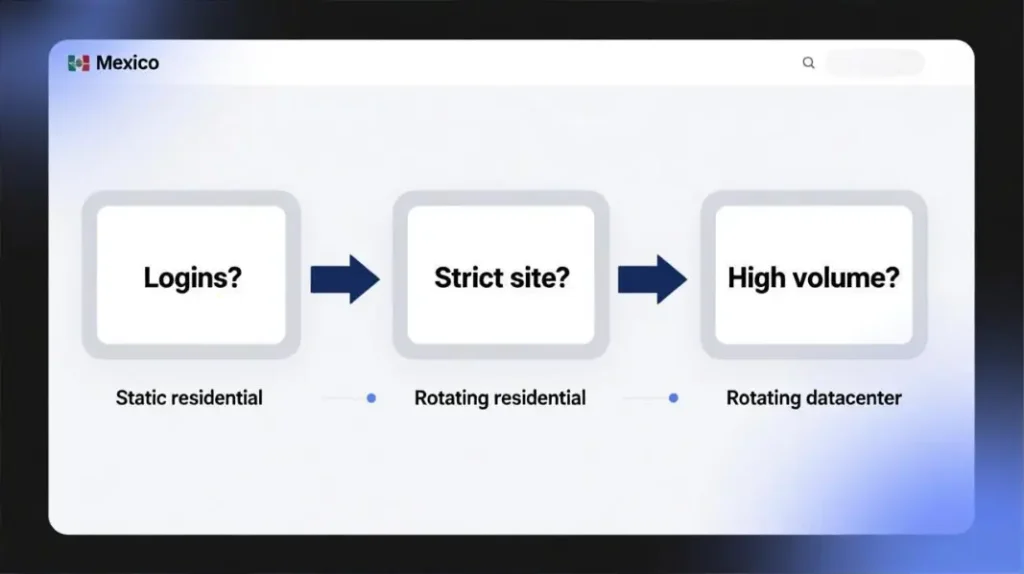
Step two is to judge whether the site behaves like it is strict
Signs a site is strict:
- CAPTCHAs show up quickly
- The homepage loads but login or checkout gets blocked
- You get “unusual activity” warnings after a few attempts
If strict, start with residential or ISP style IPs. If not strict, datacenter often wins on cost and speed.
Step three is to estimate how much volume you will run
- High volume monitoring or scraping like checking thousands of product pages, repeated stock checks, or large-scale price comparisons
Rotating datacenter is usually the budget-friendly starting point, then you upgrade if the block rate is high. - Normal browsing or occasional checks like “Does this page show Mexico shipping options”
Residential or ISP often feels smoother.
This same logic holds whether you’re searching for “Mexico proxy for price monitoring,” “Mexico proxy for ad verification,” “Mexico proxy city targeting,” or “Mexico proxy for seller account login with stable sessions.”
Proxy types explained like a friend, not an engineer
Residential, datacenter, and mobile are about how real the connection looks
- Residential and ISP proxies look like normal household or ISP users, which can reduce blocks on strict sites, but they usually cost more.
- Datacenter proxies are fast and cheap, great for volume, but strict sites may flag them more often.
- Mobile proxies look like phone networks and can be useful for certain platforms that trust mobile traffic, but they can be more expensive and less consistent.
Static and rotating describe how stable your identity is
- Static dedicated IP is like having one stable identity. It’s usually better for logins, long sessions, and workflows where consistency matters.
- Rotating changes IPs per request or by time window. It’s usually better for scale, coverage, and tasks where you don’t want one IP doing everything.

HTTP and SOCKS5 are two common proxy “formats”
- HTTP is the common choice for web browsing and many tools.
- SOCKS5 is a more universal adapter that some apps and automation tools prefer.
If you want a quick overview of where each is commonly used, a straightforward reference is Proxy protocols.
A quick comparison table to stop you from buying the wrong thing
| Proxy type | Best for | What you’ll like | What usually goes wrong |
|---|---|---|---|
| Rotating residential Mexico IPs | Ad verification, SEO rank checks, safer scraping | More “real-user” feel, often fewer blocks | Costs more; you can burn traffic if you reload heavy pages |
| Rotating datacenter Mexico IPs | Bulk crawling, price monitoring at scale, uptime checks | Fast and affordable | Stricter sites may block or CAPTCHA more |
| Static residential or ISP Mexico IPs | Seller dashboards, long sessions, stable account logins | Stable identity, easier to keep sessions consistent | Inventory and city availability can vary |
| Static datacenter Mexico IPs | Whitelisting, stable backend workflows | Predictable and fast | Consumer platforms can distrust datacenter IP patterns |
| Unlimited rotating residential | Always-on, heavy use | No GB anxiety | You can still hit site limits if behavior is too aggressive |
A practical way to use this table is to decide which failure you can tolerate:
- If you can tolerate a few blocks and you care about cost per thousand pages, start cheaper.
- If you cannot tolerate login friction and verification loops, start with stability.
Mexico-specific tips about city choice, time zone, and why results change
City choice in Mexico that usually works
For many “Mexico proxy location” needs, starting with Mexico City is a safe default because it often matches mainstream Mexico behavior. If you see inconsistent results, test a second city like Guadalajara or Monterrey before you assume the proxy is bad.
City choice matters more in real-world tasks than people expect:
- Some e-commerce sites vary shipping eligibility by region
- Some ad systems vary delivery by city-level targeting
- Some content systems are sensitive to location signals beyond just country
Time zone alignment matters for ad verification and scheduling checks
If you’re checking search ads, validating promo timing, or confirming delivery windows, your results can look wrong when your IP is Mexico but your device time zone is not.
A practical reference for Mexico City clock rules is the timeanddate page for clock changes: Clock Changes in Mexico City
Time zone rules can be trickier near border areas, so if you test border cities, this overview helps clarify why results may differ: Changes in Mexico time zones
A simple local realism checklist
For tasks where accuracy matters, match:
- IP location in Mexico
- Device time zone aligned to Mexico testing
- Browser language set to Spanish when appropriate
- A clean browser profile when testing sensitive flows
This alone fixes a surprising number of “Mexico proxy not working” complaints.
Pricing and billing models that make sense to normal buyers
Proxy pricing is confusing because it’s sold in different units. Here’s how to read it like a buyer.
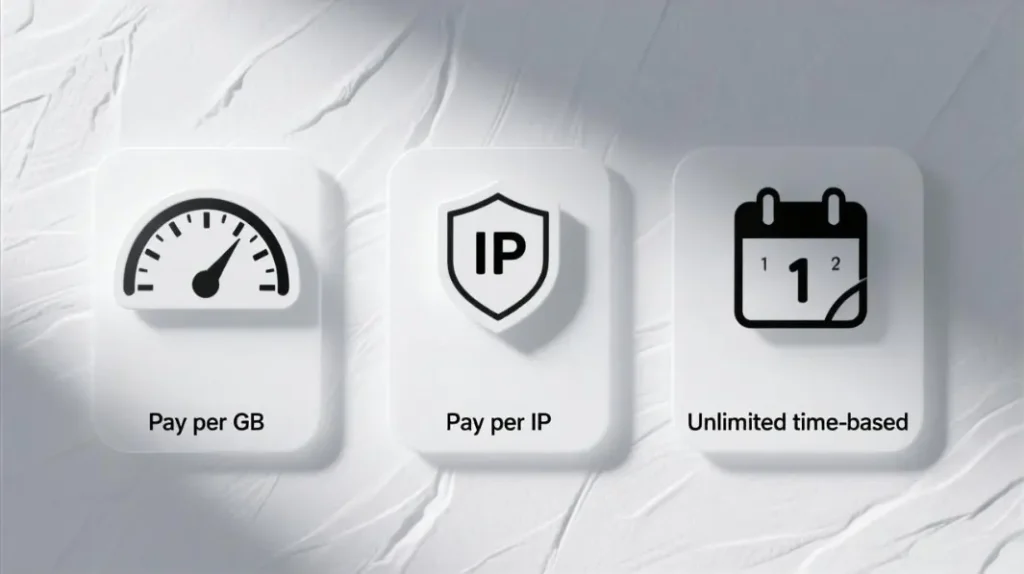
Pay per GB means you pay for traffic
This is common for rotating pools.
It fits:
- Mexico proxy for price monitoring with predictable page weights
- Mexico proxy for SEO checks and localized SERP viewing
- Mexico proxy for ad verification and landing-page validation
- Mexico proxy for data collection where requests can be controlled
The common trap is that traffic burns fast when:
- pages are media-heavy
- tools auto-retry aggressively
- you reload pages to “make it work” instead of fixing the root cause
If you want to see how traffic-based tiers are commonly laid out, this plan page is a clear example: Rotating residential proxies pricing
Pay per IP means you pay for a stable identity
This is common for static or dedicated IP plans.
It fits:
- Mexico proxy for Mercado Libre seller dashboard login with stable sessions
- Mexico proxy for Shopify admin access checks
- Mexico proxy for social account management where continuity matters
- Workflows that prefer IP whitelisting
A common buyer mistake is picking the cheapest static datacenter IP for a login-heavy workflow, then wondering why verification loops appear. For many login flows, the stability of an ISP-style identity matters more than raw speed.
Unlimited time-based plans reduce GB anxiety but not platform limits
Unlimited plans can be useful for always-on monitoring, but you still need to behave like a normal user and respect platform limits. Unlimited bandwidth does not mean unlimited automation behavior.
MaskProxy is one example of a provider that offers Mexico options across rotating and static categories, which is helpful when you want one catalog to compare billing styles without jumping between unrelated plan labels.
Pre-purchase checklist you should copy and use before paying
Use this list to avoid the most common “I bought the wrong Mexico proxy” scenario.
- Can you target Mexico by city, or only “Mexico random”
- Is the plan static or rotating, and can you control the rotation window
- What is the concurrency limit, meaning how many parallel sessions are allowed
- Does it support username and password authentication and IP whitelisting options
- Is HTTP supported and is SOCKS5 supported if your tool needs it
- For pay-per-GB plans, do failed requests and retries still consume traffic
- For static IP plans, is the IP dedicated and stable across the full billing period
- Are replacement rules clear for bad IPs or blocked destinations
- Is there a dashboard for usage, errors, and success rate
- Are usage restrictions clear and compatible with your use case
- Does support respond on the channels you actually use
- Can you test your exact target site before scaling spend
- Does the plan offer sticky sessions when your workflow needs continuity
- Can you segment usage across a team without sharing one password
A clean reference for how IP-based pricing is typically presented is: Static residential proxies pricing
Common mistakes and self-checks that match real user complaints
Below are common issues written in the same symptom language people type into Google, followed by what they usually mean and what to try next.
My Mexico IP looks right but the site still shows another country
Likely cause: the site uses multiple location signals like time zone, language, cookies, and account history.
Try next: set browser language to Spanish, align time zone, and test in a clean profile.
CAPTCHAs increased over time
Likely cause: shared IP reputation, repeated behavior patterns, or the site is stricter than the earlier test page.
Try next: reduce reloads, keep a consistent browsing path, and switch to residential or ISP style IPs for strict targets.
The homepage loads but login or checkout gets blocked
Likely cause: login endpoints are stricter than public pages.
Try next: use a static IP for logins and avoid rotating mid-session.
Speed is inconsistent or pages time out
Likely cause: pool congestion, DNS issues, or target-side throttling.
Try next: test three endpoints, try a second city, and confirm whether only one site fails.
Pay per GB burns too fast
Likely cause: retries and heavy resources.
Try next: block images and video in your tool where possible, lower concurrency, and avoid automatic refresh loops.
Works in a browser but fails in a tool
Likely cause: the tool does not support the protocol or auth format you’re using.
Try next: switch protocol or confirm whether the tool expects SOCKS5, then re-test.
Multiple accounts trigger verification
Likely cause: too many identities sharing one IP.
Try next: one account per environment and one stable IP per environment for login-heavy workflows.
Setup steps that do not require engineering skills
You usually only need three things from your provider:
- Host
- Port
- Username and password, or an IP whitelist method
Fast browser setup
- Put the proxy details into your browser method
- Confirm the IP shows Mexico
- Open your target site and verify the exact behavior you care about, such as MXN pricing, Mexico shipping, or ad delivery
Fast tool setup
- Find the proxy settings screen in the tool
- Paste host, port, username, password
- Choose HTTP or SOCKS5 based on what the tool supports
- Run a small test before scaling the workload
If you’re verifying ads in Mexico, it helps to validate what Google says your configuration should do before blaming your proxy setup: About the Ad Preview and Diagnosis tool
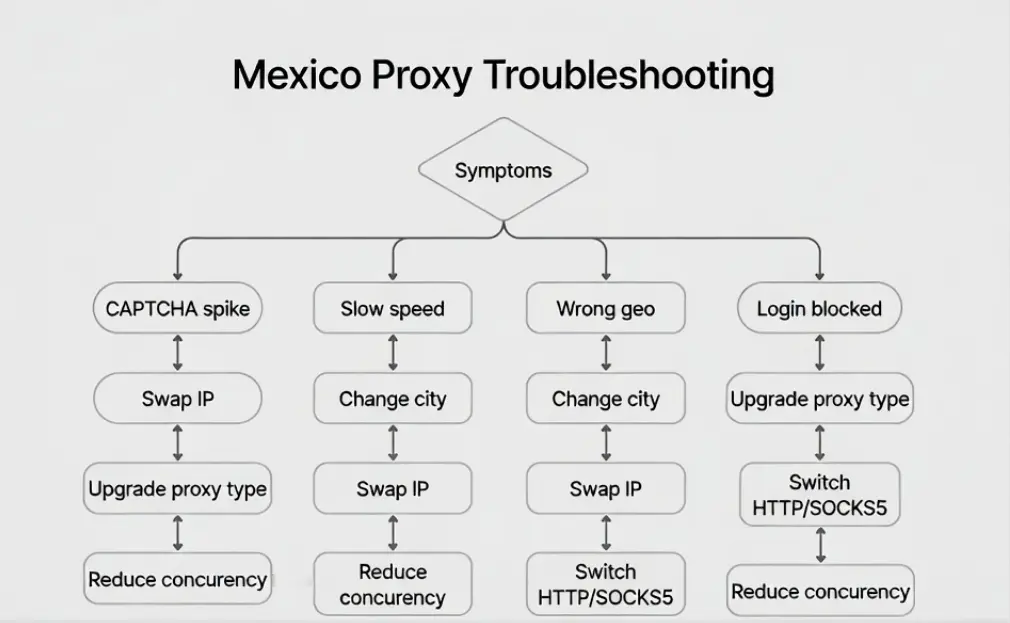
Troubleshooting flow you can follow when something breaks
When something fails, don’t randomly change five things at once. Use this order.
Step one is to decide whether it is a proxy config problem or a target-site problem
- If every site fails, your proxy settings or authentication are wrong
- If only one site fails, that site is blocking or throttling you
Step two is to change one variable at a time
- Same plan, new IP
- Same plan, different city in Mexico
- Same city, upgrade type from datacenter to residential or ISP
- Same type, switch protocol from HTTP to SOCKS5 or vice versa
- Reduce concurrency and keep sessions stable for login flows
Step three is to send support evidence that actually helps
- Timestamp, target URL, proxy endpoint used, screenshot of the error
- Whether HTTP or SOCKS5
- Whether rotating or static
- Whether this happens on one site or many
If you want a simple way to understand what scale costs before you commit, this traffic-based tier page is a clear reference: Rotating datacenter proxies pricing
Compliance and safety rules that keep you out of trouble
A proxy is a tool. How you use it matters.
- Respect site terms and access policies, especially for automation-heavy tasks
- Avoid collecting sensitive personal data
- Keep credentials protected and avoid sharing one account across many people
- Do not treat proxies as invisibility; platforms also evaluate behavior patterns
A security-focused explanation of how scraping appears from a web-app threat perspective is useful context when you’re designing a safer workflow: OWASP OAT-011 Scraping
A final buying pattern that works in the real world
Start by writing down your task in one line, because that line determines everything:
- Mexico proxy for Mercado Libre seller login with stable sessions
- Mexico proxy for ad preview checks and landing page localization
- Mexico proxy for price monitoring with low cost per thousand pages
- Mexico SOCKS5 proxy for a tool that only supports SOCKS5
- Mexico proxy with city targeting for Mexico City and Guadalajara testing
Then choose the proxy type that matches the line, buy small, test, and only then scale.
When you want one catalog that keeps rotating, static, and protocol options consistent in one place, Mexico proxies is a practical baseline to keep your plan terminology aligned while you compare fit and performance.

Daniel Harris is a Content Manager and Full-Stack SEO Specialist with 7+ years of hands-on experience across content strategy and technical SEO. He writes about proxy usage in everyday workflows, including SEO checks, ad previews, pricing scans, and multi-account work. He’s drawn to systems that stay consistent over time and writing that stays calm, concrete, and readable. Outside work, Daniel is usually exploring new tools, outlining future pieces, or getting lost in a long book.
FAQ
1. Do I need residential proxies for ad verification in Mexico
If your target pages are strict or you see repeated CAPTCHAs, residential or ISP-style IPs usually behave more like normal users. If your checks are lightweight and the sites are not strict, rotating datacenter can be cost-effective.
2. Static or rotating for e-commerce admin logins
Static is usually safer for login-heavy workflows because it maintains a stable identity and reduces session churn.
3. Why does Mexico City work but another city fails
Inventory quality and platform personalization can vary by city and network. Treat city choice as a testing knob rather than a fixed assumption.
4. HTTP or SOCKS5 for Mexico proxies
HTTP is often fine for browsers and many tools. SOCKS5 can be more compatible for certain apps and automation tools that expect a more general proxy layer.
5. How do I stop GB-based plans from burning too fast
Reduce retries, avoid heavy media loads, block unnecessary resources, and run a small acceptance test before scaling.
6. Does Mexico City use Daylight Saving Time in 2026
Mexico City does not observe DST in 2026, which simplifies ad and schedule verification.