Instagram Proxies for Automation, Scraping, Ad Checks

Build safer Instagram workflows for multi-account, automation, monitoring, and ad verification with stability-first routing and checklists.
Instagram proxies are not “magic anti-ban tools.” They are routing tools. Used well, they reduce friction by keeping your account’s network identity consistent. Used poorly, they create the exact pattern Instagram distrusts. If you’re evaluating instagram proxies for real workflows, treat the decision as “identity stability vs scale routing,” not “how fast can I rotate.”
This guide is built for operators who need one page that covers:
- Choosing proxies for Instagram (commercial investigation)
- Instagram proxy setup on iPhone, Android, and desktop profiles (how-to)
- Instagram risk control: bans, checkpoints, feedback_required, and rate limits (problem solving)
Every section uses the same operating format:
Risk → Reason → Action → Parameters → Verify signals
Quick conclusions for different teams
Pick the route that matches your workflow, then prove it with verification signals
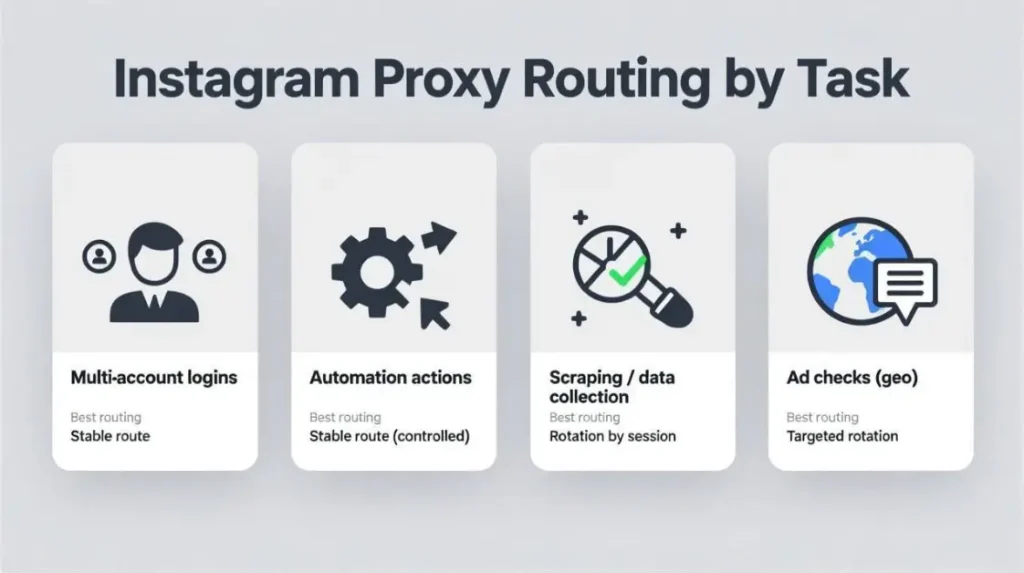
Multi-account operators
Goal: keep each account isolated and logged in long term.
Action
- One account → one browser profile → one dedicated proxy
- Keep the route region-bound for weeks
Parameters
- Proxy type: static residential proxies or ISP
- Session: Sticky for 7–30 days
- Rotation: Off for login traffic
- Geo: Same country and usually same city for the account lifetime
Verify signals
- 7 consecutive days with no repeated 2FA, no checkpoint, no suspicious_login
- Login succeeds on the first attempt across 3–5 routine sessions
- No “cluster events” where multiple accounts get challenged on the same day
Automation and growth tools
Goal: reduce action blocks while running controlled activity.
Action
- Split identity traffic from scale traffic
- Make the login route stable, then pace actions
Parameters
- Identity route: residential proxies or ISP, dedicated per account
- Scale route: rotating residential proxies with session stickiness 5–20 minutes
- Concurrency: Start at 1–2 threads per warmed account group
- Backoff: Exponential on friction signals
Verify signals
- Action success rate stays stable for 3 days
- feedback_required events fall below 1 per day per 10 accounts
- “Try Again Later” blocks trend down week over week
Scraping and competitor monitoring
Goal: collect public data without burning your login identities.
Action
- Use rotating pools for data tasks
- Rotate by session, not per request
- Add retries with backoff
Parameters
- Proxy type: rotating proxies
- Sticky session: 5–20 minutes
- Retry: 2–4 attempts with increasing delays
- Rotation trigger: rotate after failures, not randomly
Verify signals
- Success rate ≥ 95% on target pages for 3 consecutive runs
- Captcha frequency trends down by day 3
- No “all requests blocked” pattern from one overloaded IP
Ad verification and localization checks
Goal: verify geo-specific content and ads reliably.
Action
- Align geo, timezone, and language
- Keep the route stable for the whole verification workflow
Parameters
- Proxy type: residential or mobile for credibility
- Geo: City-level only if you truly need it
- Session: Sticky for the entire verification run
- Browser locale: match the target region
Verify signals
- Ad delivery is consistent across 3 sessions
- No unusual activity prompts during checks
- Content locale matches expected language and region
What competitors miss and what you should do instead
These gaps cause most Instagram proxy failures in real operations
Many Instagram proxy posts explain proxy types or recommend providers, but they rarely turn advice into an operating system. Here are 9 points that are usually not made clear, plus what to do and how to verify it.
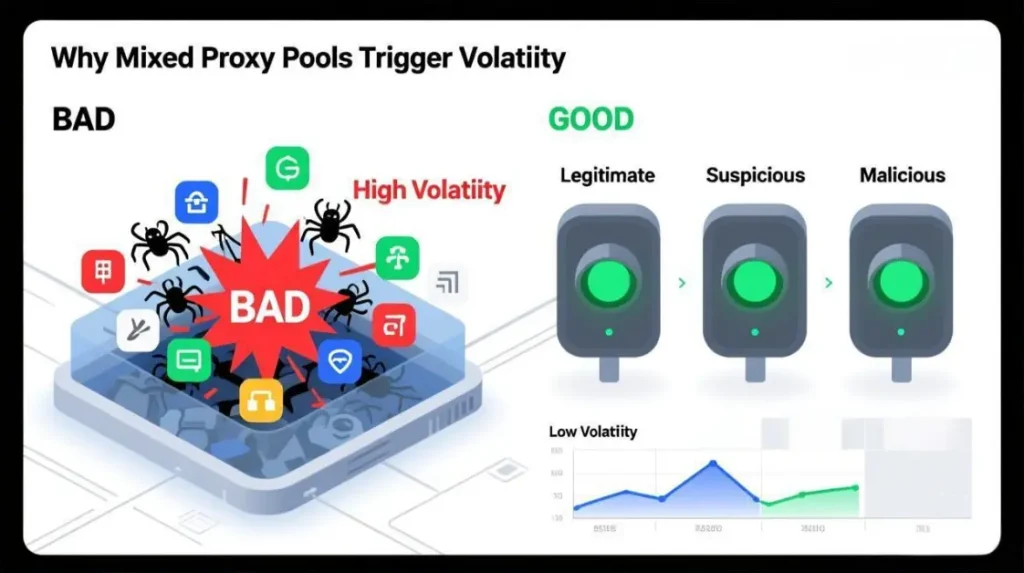
1 They don’t define stability windows
Risk
Rotation that is too frequent looks like account takeover.
Action
Treat login identity as a 7–30 day stability window. Rotate only for scraping and monitoring workloads.
Parameters
- Login route: static proxies or long-sticky
- Data route: session-rotating
Verify signals
- 7 days with 0 repeated 2FA and 0 checkpoint events
- suspicious_login disappears across 3–5 routine logins
2 They don’t separate traffic by task
Risk
One proxy strategy for everything creates mixed signals.
Action
Split routing into identity traffic and scale traffic.
Parameters
- Identity: static route per account
- Scale: rotating pool, session-based
Verify signals
- Action blocks drop while login stability stays intact
- feedback_required stays below 1 per day per 10 accounts
3 They don’t give rotation rules that match Instagram behavior
Risk
Per-request rotation churn looks bot-like and breaks sessions.
Action
Rotate by session and rotate on failures.
Parameters
- Sticky session: 5–20 minutes
- Rotate after 2 failures, not every request
Verify signals
- Success rate ≥ 95% for 3 runs
- Captcha incidence trends down by day 3
4 They don’t explain geo, timezone, and language alignment
Risk
A Japan IP with a Brazil timezone and English locale screams inconsistency.
Action
Match geo, timezone, and language.
Parameters
- Set timezone to proxy region
- Set browser language to target audience
Verify signals
- 0 unusual activity prompts during 3 sessions
- Localization checks are consistent and repeatable
5 They skip DNS and WebRTC leak validation per profile
Risk
Your proxy shows one country while DNS or WebRTC leaks another.
Action
Validate IP, DNS, and WebRTC for every profile before login.
Parameters
- Run leak tests on each browser profile
- Keep one route tied to one profile
- Use a stable identity route with predictable stickiness (MaskProxy is a common fit here)
Verify signals
- IP, DNS, and WebRTC show no conflicting location or local IP exposure
- 7 days with no recurring suspicious_login events on that profile
6 They don’t provide a warm-up ramp with stop rules
Risk
New accounts scaled too quickly hit rate limits and action blocks.
Action
Ramp gradually and stop on friction signals.
Parameters
- Week 1: low volume
- Week 2: increase only after stable days
- Keep the same proxy during warm-up
Verify signals
- Week 1 completes with 0 checkpoints
- Low-risk action success rate ≥ 90%
7 They don’t enforce isolation standards
Risk
Reusing profiles or proxies across accounts creates clustering risk.
Action
One account, one profile, one proxy.
Parameters
- Dedicated route per account
- No shared cookies or fingerprints
- Keep an identity pool separate from a scraping pool (MaskProxy works cleanly as an identity pool)
Verify signals
- 14 days with no simultaneous checkpoint wave across multiple accounts
8 They don’t turn troubleshooting into a diagnosis order
Risk
People guess, change everything, and never isolate root cause.
Action
Debug in the same order every time.
Parameters
- Pool reputation → leaks → identity mismatch → pacing
- Keep a known-clean control route for comparisons
Verify signals
- Root cause confirmed within 2 controlled tests
9 They don’t add reliability controls for scale
Risk
No backoff means you hammer into rate limits.
Action
Use backoff, jitter, and error budgets.
Parameters
- Retry 2–4 times with increasing delays
- Pause on 429-like patterns
- Cap concurrency until stability holds
Verify signals
- Hard failures stay under 2% over a 3-day run
- Median completion time remains stable
The decision framework to choose Instagram proxies
Use the decision tree first, then confirm with the scoring table
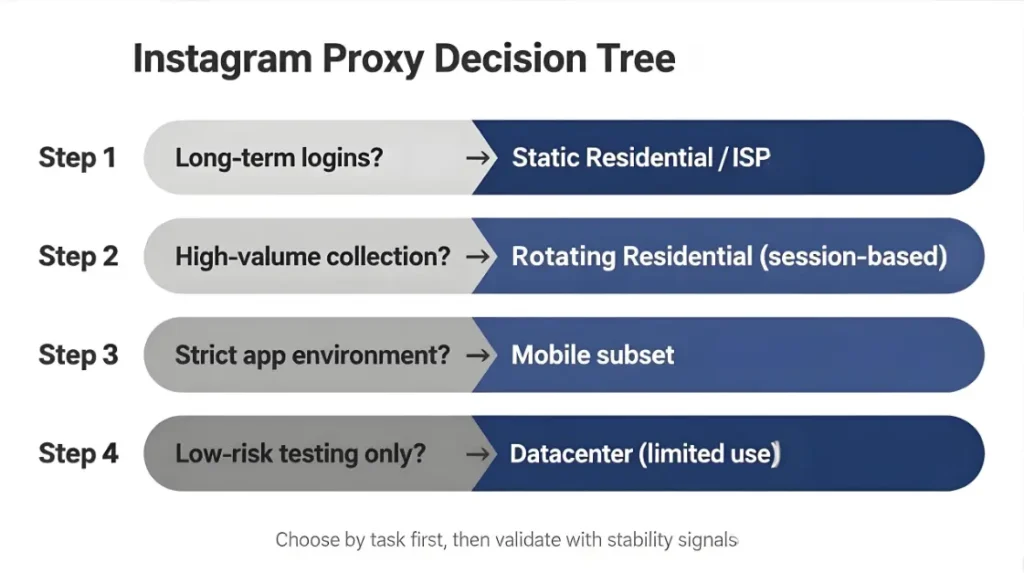
Decision tree
Answer in order. Stop when you hit a match.
- Are you keeping accounts logged in for days or weeks
- Yes → static residential proxies or ISP dedicated per account
- No → go to 2
- Are you scraping or monitoring at scale
- Yes → rotating residential proxies with session-based rotation
- No → go to 3
- Do you need the highest trust for app-heavy flows or strict environments
- Yes → mobile for the sensitive subset
- No → go to 4
- Is cost the top constraint and the task is low-stakes
- Yes → datacenter proxies can be acceptable for non-login testing
- No → residential proxies are the safer default
Verify signals
- Checkpoint frequency drops by at least 50% within 7 days
- suspicious_login does not recur across 3–5 routine sessions
Scoring table
Score each option 1–5, multiply by weight, pick the highest total.
Weights
- Login stability 30%
- Risk control fit 25%
- Geo precision 15%
- Scale 15%
- Cost efficiency 15%
What to score
- Sticky session control and maximum stickiness
- Authentication method you can operate reliably
- Pool reputation management and recycling policies
- City or ASN targeting if needed
- Compatibility with your tooling
Verify signals
- 7 days with no repeated 2FA and no checkpoint on identity routes
- ≥ 95% success rate with stable runtime on scraping routes
Why Instagram triggers checkpoints, bans, and 2FA loops
Risk control is consistency across time windows
The four-signal bundle
Instagram correlates signals across sessions:
- IP and network reputation
- Device or browser profile fingerprint
- Behavior pattern and pacing
- Time window consistency
The stability-first rule
Risk
If IP changes frequently during login, it resembles account compromise. If behavior ramps too quickly, it resembles automation abuse.
Action
Lock identity signals first, then scale only after stability holds.
Parameters
- Keep login route stable for 7–30 days
- Avoid country switches between sessions
- Ramp actions gradually after warm-up
Verify signals
- 7 days with no checkpoint events on routine logins
- 3 consecutive sessions show normal behavior without friction prompts
- Reduction in repeated “new login” notifications
Proxy types for Instagram and when each is good enough
Choose based on risk, not hype
Residential proxies
Best default for multi-account stability and most automation workflows.
Action
Use residential for identity routes, keep them static or long-sticky.
Parameters
- static residential proxies or sticky sessions 7–30 days
- Dedicated per account for valuable profiles
Verify signals
- 7 days without repeated 2FA and checkpoints per account route
ISP proxies
Often the best balance for high-value accounts that need long sessions.
Action
Use ISP for accounts that keep getting challenged on residential routes.
Parameters
- Dedicated static IP per account
- Keep region and city consistent
Verify signals
- suspicious_login disappears across 5 routine logins
- Checkpoint rate stays near zero for 14 days
Mobile proxies
Best for strict trust environments and app-heavy flows.
Action
Use mobile for the sensitive subset, not for everything.
Parameters
- Assign mobile routes to the accounts that repeatedly fail stability checks
- Keep sessions sticky long enough to complete workflows
Verify signals
- 7 days with no checkpoint events for the subset on mobile
Datacenter proxies
Useful for low-stakes tasks. Riskier for identity traffic.
Action
Keep datacenter away from precious logins.
Parameters
- Use for QA or non-login monitoring
- Avoid for long-lived sessions
Verify signals
- Datacenter routes do not create login friction spikes across accounts
Instagram proxy setup
iPhone, Android, and desktop browser profiles
Before you start, gather these: host, port, username/password or IP whitelist, protocol, and stickiness settings. If you’re unsure which protocol to choose for your toolchain, start with the basics in proxy protocols and keep the same choice consistent across environments.
iPhone setup
Proxy settings apply per Wi-Fi network.
Action steps
- Settings → Wi-Fi
- Tap the i icon next to your connected network
- Scroll to HTTP Proxy
- Select Manual
- Enter Server and Port
- Enable Authentication if needed, then enter username and password
- Save and validate
If you want an Apple reference for what “manual proxy” expects (server, port, optional credentials), use Apple’s proxy configuration documentation.
Common mistakes
- Wrong port for the protocol
- Hidden whitespace in credentials
- Switching Wi-Fi networks resets proxy routing
Verify signals
- check my IP shows the correct geo
- DNS and WebRTC show no conflicting location
- Instagram login succeeds with no repeated “new login” prompts
Android setup
Labels vary by device, the flow is consistent.
Action steps
- Settings → Network and Internet → Internet
- Choose your current Wi-Fi network
- Edit → Advanced options
- Proxy → Manual
- Enter proxy hostname and port
- Save and validate
A Google support reference for these Wi-Fi proxy steps (Network & internet → Internet → Edit → Advanced options → Proxy) is here: Manage advanced network settings on your Pixel phone.
Common mistakes
- Proxy set on Wi-Fi but you are on mobile data
- Auth not supported in your Android UI
- Use IP whitelisting or a proxy manager app
Verify signals
- IP geo matches target
- No DNS or WebRTC mismatch on the environment you actually use
- 3 routine sessions occur without checkpoint prompts
Desktop and browser profile routing
This is the cleanest way to run automation, scraping, and ad checks without mixing identities. If your tooling requires a specific protocol, map it early (for example, HTTP proxies vs SOCKS5 proxies) so your test and production routes behave the same way.
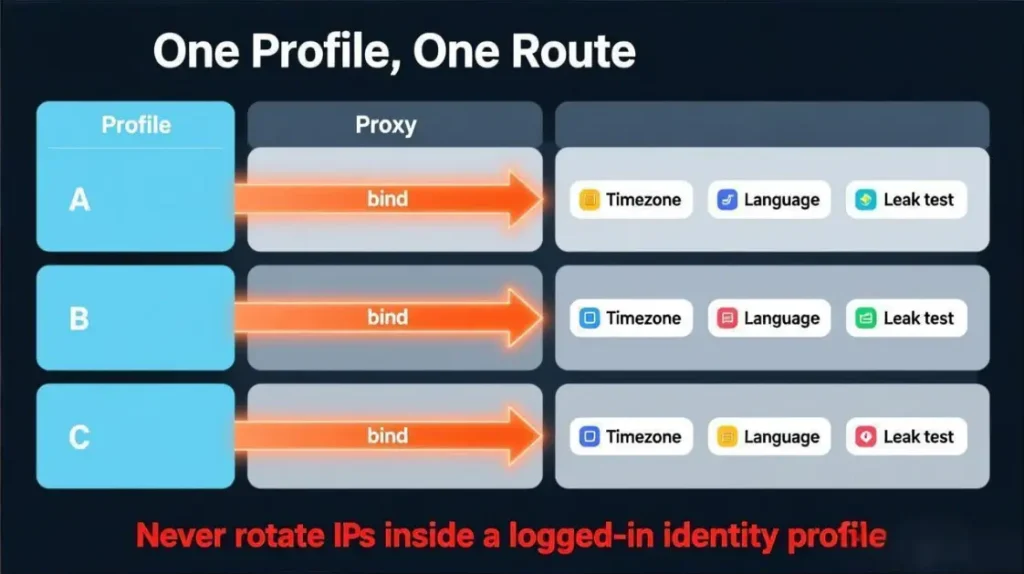
Action
One profile per account, each profile gets one stable route.
Step-by-step logic
- Create Profile A for Account A
- Assign Proxy A to Profile A
- Set timezone to match proxy region
- Set language and locale to match target audience
- Run leak tests and fix mismatches
- Log in and keep this route stable for weeks
Common mistakes
- One proxy shared by multiple high-value accounts
- Rotating IPs for login sessions
- Logging in from different devices and geos inside the same week
Verify signals
- 7 days with no repeated 2FA and no checkpoint for that profile
- Stable session persistence across 3–5 routine logins
- No “cluster” of challenges across your account set
MaskProxy is a practical option when you want stable identity routes across multiple profiles and need the routing behavior to remain consistent over long windows.
Five operational playbooks
Actions, parameters, and verify signals for real workflows
1 Multi-account matrix operations
Risk
Account linkage through shared network identity.
Action
One account, one profile, one proxy.
Parameters
- Proxy type: static residential or ISP
- Session: sticky 7–30 days
- Rotation: off for login
- Geo: consistent country and typically consistent city
Verify signals
- 14 days with no simultaneous checkpoint wave across accounts
- No repeated 2FA loops for 7 days per account
- Routine actions succeed without sudden blocks
2 Account warm-up proxy and login stability
Risk
New accounts scaled too fast trigger friction.
Action
Warm up slowly under a stable route.
Parameters
- Week 1: low volume, steady cadence
- Week 2: increase only after stable days
- Same proxy during warm-up
Verify signals
- Week 1 completes with 0 checkpoints
- Low-risk action success rate ≥ 90%
- No suspicious_login across 3–5 routine sessions
3 Automation pacing and Instagram rate limit control
Risk
Rate limits and action blocks from repetition and speed.
Action
Set caps, add spacing, stop on friction signals.
Parameters
- Concurrency: start low, scale slowly
- Backoff: exponential when errors appear
- Split routes: stable login route + rotating scraping route
- Cooldown: pause 12–48 hours after severe friction
Verify signals
- feedback_required under 1 per day per 10 accounts
- Action blocks trend down week over week
- Success rate stabilizes over 3 consecutive days
4 Scraping and competitor monitoring
Risk
Overloading a single IP or rotating too aggressively.
Action
Rotate by session, retry with backoff, cap concurrency.
Parameters
- Rotating residential
- Sticky session 5–20 minutes
- Retry 2–4 attempts with increasing delays
- Rotate after repeated failures
Verify signals
- Success rate ≥ 95% across 3 runs
- Captcha frequency trends down by day 3
- Stable median runtime per run
If your workflow touches scraping, align the plan with Instagram’s stance on data scraping and restrictions before you scale. Here’s a direct Instagram Help Center reference: Why your account has been restricted for data scraping. Instagram Help Center
5 Ad verification and geo checks
Risk
Geo and identity mismatch invalidates results.
Action
Align geo, timezone, and language and keep the route stable.
Parameters
- Proxy type: residential or mobile
- Geo: city-level only when required
- Session: sticky for the entire verification workflow
Verify signals
- Ads match expected locale across 3 sessions
- No unusual activity prompts during checks
- No new login friction introduced by geo switching
Troubleshooting and diagnostics
A repeatable sequence to isolate the real cause
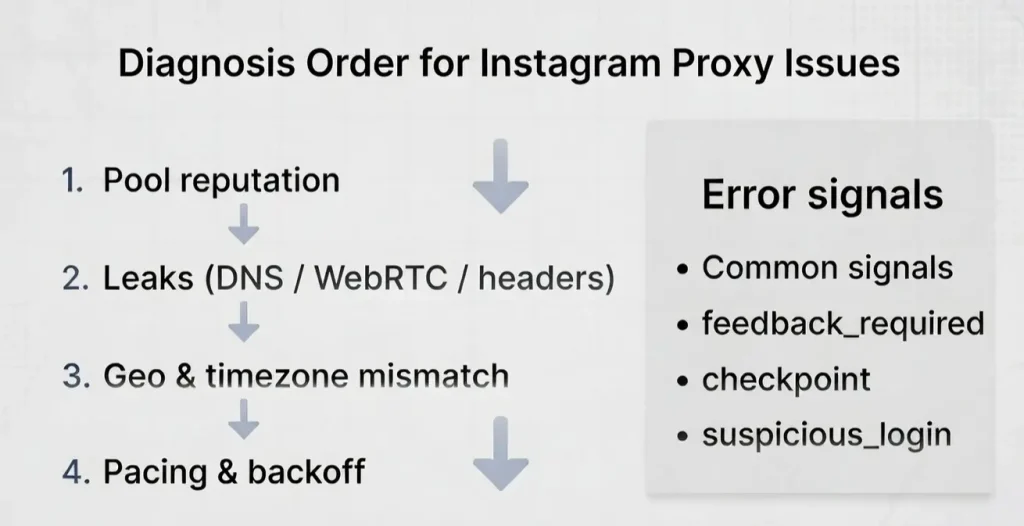
The diagnosis order
- Pool reputation and provider stability
- DNS and WebRTC leaks
- Identity mismatch across geo, timezone, profile
- Behavior pacing and rate limits
Verify signal
- Root cause confirmed within 2 controlled tests using a known-clean route versus your current route
Instagram IP ban patterns
Symptoms
Sudden blocks across many requests, frequent challenges, persistent failures.
Action
- Switch to a known-clean pool
- Reduce concurrency and add backoff
- Keep burned IPs away from login identity routes
Verify signals
- Hard failures fall below 2% over the next 3 runs
- Normal browsing works without immediate friction prompts
feedback_required
Action
- Pause actions 12–48 hours
- Resume with slower pacing and stable identity routes
- Reduce repetitive patterns
Parameters
- Longer intervals
- Lower daily caps until stable
Verify signals
- 3 consecutive sessions without feedback_required
- Action success rate stabilizes without blocks
checkpoint
Action
- Return to last known stable proxy and profile
- Avoid new device logins during recovery
- Keep route stable for several days
Verify signals
- No checkpoint recurrence across 5 routine logins
- Reduced 2FA prompts week over week
suspicious_login
Action
- Align timezone and language to proxy geo
- Stop country switching
- Keep a stable route
Verify signals
- suspicious_login disappears across 3–5 routine logins
- No “new login” turbulence during normal access
Frequent 2FA prompts
Action
- Stop rotating for login traffic
- Move fragile accounts to ISP or mobile subset
Verify signals
- 7 days with no repeated 2FA loops
- Routine logins become first-attempt successful
Actions blocked
Action
- Reduce action volume, increase spacing
- Add cooldown rules
- Tier accounts by warm-up status
Verify signals
- Success rate recovers over 3 days
- Block frequency trends down week over week
Sudden disconnects and session drops
Action
- Validate uptime and stickiness
- Use sticky sessions for identity work
- Avoid overly recycled pools
Verify signals
- Sessions persist without repeated logins for 7 days
- No daily spikes of disconnect-related challenges
For policy alignment on automated access and collection, keep Instagram’s Terms in mind, especially around automated access and collection. A direct reference is here: Instagram Terms of Use.
Proxy type comparison table for Instagram
A quick way to map stability, cost, and risk-control fit
| Proxy type | Login stability | Cost | Scale | Risk-control risk | Recommended use |
|---|---|---|---|---|---|
| Datacenter | Medium to low | Low | High | Higher | Low-stakes testing, non-login tasks |
| Residential | High | Medium | High | Medium | Multi-account, most automation |
| ISP | Very high | Medium to high | Medium | Low | High-value accounts, long sessions |
| Mobile | Highest | High | Low to medium | Lowest | Strict trust, fragile subsets |
| Static routing | Best for identity | Varies | Medium | Lower | Login, warm-up, long sessions |
| Session rotation | Best for scale | Varies | High | Medium | Scraping, monitoring, data checks |
| Per-request rotation | Often unstable | Varies | High | Higher | Rarely recommended for Instagram |
Verify signals
- Identity routes: 7 days with no repeated 2FA and no checkpoint
- Scraping routes: ≥ 95% success rate with stable runtime and fewer captchas by day 3

Daniel Harris is a Content Manager and Full-Stack SEO Specialist with 7+ years of hands-on experience across content strategy and technical SEO. He writes about proxy usage in everyday workflows, including SEO checks, ad previews, pricing scans, and multi-account work. He’s drawn to systems that stay consistent over time and writing that stays calm, concrete, and readable. Outside work, Daniel is usually exploring new tools, outlining future pieces, or getting lost in a long book.
FAQ
1. Do I need residential proxies for Instagram
Do I need residential proxies for Instagram
2. Are mobile proxies required
Only for sensitive subsets where other types keep triggering checkpoints.
3. Can I use a VPN instead
A VPN can be okay for personal use, but it usually lacks account isolation, session control, and predictable pools for scaled workflows.
4. Static vs rotating, which should I use
Static for login identity. Rotating by session for scraping and monitoring. Avoid rotating for login.
5. How many IPs does one account need
Start with one dedicated IP per account for identity. Add a separate rotating pool for scraping.
6. How often should I change IPs
For login, avoid frequent changes. For scraping, rotate by session with controlled stickiness.
7. Why do I get suspicious_login even with proxies
Instagram correlates IP, profile signals, pacing, and time windows. Abrupt changes trigger friction.
8. What causes Instagram rate limit issues
High frequency, repetition, and concurrency without backoff. Fix pacing and cooldown rules.
9. What does feedback_required mean
A temporary restriction often triggered by spam-like patterns. Pause, slow down, resume carefully.
10. What is a beginner-friendly setup
One account per browser profile with one dedicated static proxy, stable geo and timezone, and a slow warm-up ramp.
11. How long should warm-up take
At least 7 days of stable, low-volume activity before scaling. Longer if the account is new or flagged.
12. How do I know the proxy is the problem
If switching to a known-clean route fixes the issue immediately, pool reputation or leak configuration is likely the cause.