What “unlimited” really means in rotating residential proxy plans
If you’re searching for “unlimited rotating residential proxies”, you’re usually not chasing a buzzword.
You’re trying to fix very specific problems:
- You’re tired of watching every extra GB on the bill.
- You need more volume for scraping or monitoring than per-GB plans comfortably allow.
- Your multi-account workflows are fragile, and bandwidth feels like the only lever left.
On a pricing page, unlimited or unmetered looks like a magic button.
In real projects, it often introduces a different set of issues:
- Jobs slow down or stall once you push real traffic.
- Success rate collapses on key endpoints, captchas spike.
- Account risk goes up because routes look more aggressive and less “human”.
This article is not about slogans. It’s a how-to for teams who want real answers:
- How to design routes so unlimited bandwidth helps instead of hurts.
- How to split tasks, pools, and pricing models so each part of your workload runs on the right line.
- How to test whether any “unlimited” plan will survive your real traffic.
When we mention unlimited rotating residential proxy routing, treat it as one building block inside a larger design, not a one-click solution.
1. Start from the real pain, not from the word “unlimited”
Most teams who end up disappointed with unlimited / unmetered plans fell into the same trap:
They bought a pricing label, not a routing design.
The underlying pain points are usually three things.
1.1 Bandwidth anxiety
- You keep checking traffic dashboards.
- You keep turning useful jobs on and off to avoid overages.
- You spend time explaining “why we used more GB this month” instead of improving workflows.
Unlimited sounds like freedom from that.
1.2 Workflow instability
Once you lean on an unlimited plan:
- Success rate drops as you increase concurrency.
- Timeouts, 429s and captchas become normal.
- Your team spends more time fighting unreliable runs than shipping features.
From your perspective:
“This unlimited plan is unreliable.”
From the provider’s perspective:
“This customer is pushing beyond what we consider normal, so we’re throttling.”
1.3 Account risk
When you mix heavy volume with fragile accounts:
- Logins trigger more 2FA and risk checks.
- “Unusual activity” emails appear more often.
- Multi-account store or social groups start showing association warnings.
You didn’t change your business logic.
You just let more volume and more concurrency hit the same identity patterns.
Key point:
“Unlimited” on the invoice only touches bandwidth.
To fix instability and account risk, you must separate traffic types and give each type routes that match its risk and cost profile.
2. The three levers you’re really paying for
Behind every proxy plan, there are three things that actually matter:
- Bandwidth – how much data you move
- Concurrency – how many things you do at once
- IP identity – how “normal” or “suspicious” you look to targets
Unlimited / unmetered plans mainly address (1).
Providers control (2) and (3) via:
- Concurrency caps
- Fair-use policies
- Choice and mix of IP types (DC vs residential vs ISP-residential)
- How pools are rotated and refreshed
This logic is not unique to proxy networks. In general web infrastructure, providers use rate limiting and concurrency ceilings to keep systems healthy under load. Cloudflare, for example, describes rate limiting as simply capping how often someone can repeat an action in a given time window to protect applications from overload rather than to sell “more bandwidth”.
So the useful questions are not:
“Is this plan truly unlimited?”
but:
- Which parts of my workload are bandwidth-hungry but low-risk?
- Which parts are identity-sensitive (accounts, payments, long-term trust)?
- Where do I genuinely need residential identity, and where do I just need cheap throughput?
Once you have those answers, you can design routes that make sense.
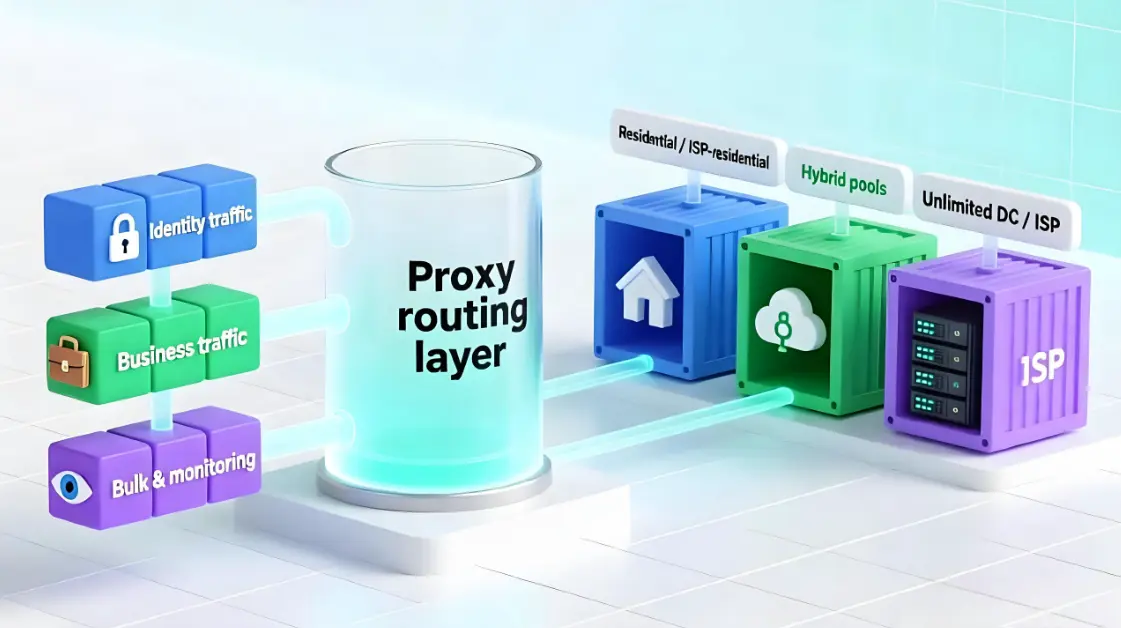
3. Split your traffic into three buckets
Before you choose any provider or plan, build a simple model of your own traffic.
For almost every operation, it can be split into three buckets:
- Identity traffic
- Logins
- 2FA and verification flows
- Device / session binding
- Profile, payment or security-related edits
- Business traffic
- Day-to-day actions that produce value:
- Posting, listing, bidding
- Order management, messaging, campaign updates
- Day-to-day actions that produce value:
- Bulk / monitoring traffic
- High-volume reads:
- Scraping public data
- Polling APIs
- Price / stock monitoring
- Dashboards and analytics refresh
- High-volume reads:
Roughly:
- Identity is high-risk, low-volume.
- Business is medium-risk, medium-volume.
- Bulk / monitoring is low-risk, very high-volume.
The rest of this article shows exactly how to treat these three buckets:
- which bucket should sit on unlimited DC / ISP,
- which must stick to residential / ISP-residential,
- where unlimited residential proxy pools for high-volume workflows actually make sense.
4. Pattern 1 – High-volume scraping with some logins
4.1 When this pattern fits
This is you if:
- You pull a lot of pages or APIs from a few domains.
- Some routes require login, but most are read-only.
- Your main KPI is cost per successful page / record, not just per-GB price.
4.2 How to wire it (step by step)
Step 1 – Create two proxy pools
In your proxy manager, gateway, or config, define:
bulk_pool- Cheap unmetered / unlimited DC or ISP proxies
- High concurrency allowed
login_pool- Residential or ISP-residential
- Can be metered or unlimited, but treated as expensive capacity
If your provider offers something like an unmetered high-volume residential proxy pool, you can plug that into login_pool as long as you still treat it as protected, not “spray everywhere”.
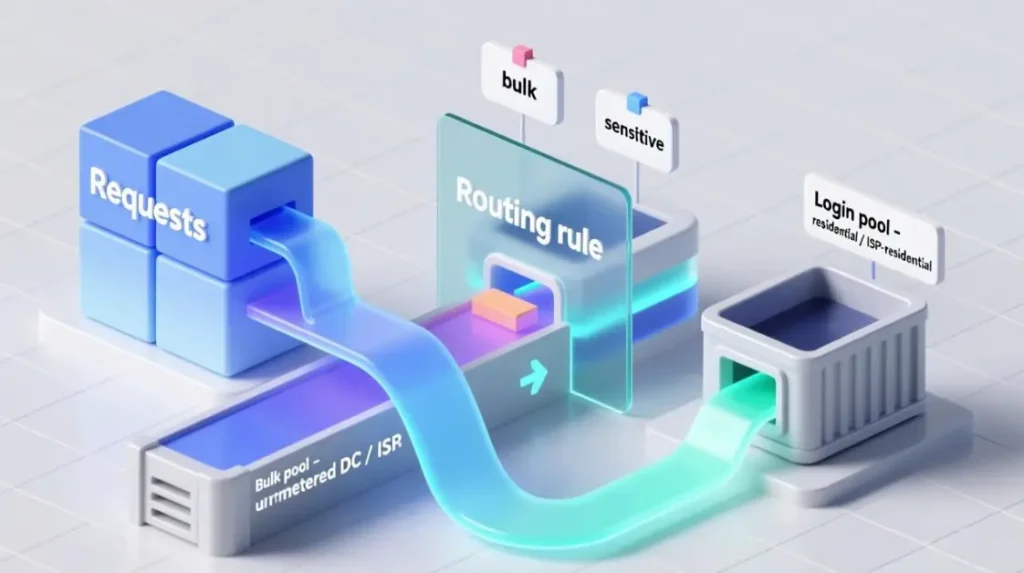
Step 2 – Tag requests by sensitivity
In application code (or your proxy manager rules):
- For each outgoing request, set
sensitivity:sensitiveif it hits endpoints like:/login,/auth,/session,/checkout- any endpoint that changes user-visible state
bulkfor everything else (list pages, public APIs, static assets, etc.)
Step 3 – Routing rule
- If
sensitivity == bulk→ send viabulk_pool - If
sensitivity == sensitive→ send vialogin_pool
This is where unlimited bandwidth starts working for you instead of against you.
Step 4 – Add controlled fallback
Some endpoints look bulk-like but behave as sensitive.
Add logic:
- If a
bulkrequest failsNtimes in a row onbulk_pool(for example, N = 3):- Try once via
login_pool - Log this as
bulk_promoted_to_residentialwith the endpoint path
- Try once via
After a week, you’ll have a list of endpoints that genuinely require residential identity. Then you can:
- Always route those endpoints via
login_pool, or - Redesign the workflow to hit them less aggressively
Step 5 – Guardrails
To avoid “everything ends up on residential”:
- Cap max concurrent sessions per target in
login_pool(for example, 5–20). - Add alerts if
login_poolrequests grow beyond a target share of total traffic (say 20–30%).
4.3 How you know it’s working
Track:
- Success rate on bulk endpoints as you increase concurrency.
- Residential GB usage (your expensive bucket).
- Number of
bulk_promoted_to_residentialevents.
If the pattern is working:
- 80–90% of your requests ride on cheap unlimited lines.
- The 10–20% that hit
login_poolare precisely the ones that break without residential identity.
5. Pattern 2 – Multi-account social / e-commerce operations
5.1 When this pattern fits
This is you if:
- You run multiple stores / social / ad accounts per region.
- You’ve seen association, clustering, or “unusual activity” warnings.
- Each account (or small group) needs to look like a consistent person or business, not just a rotated IP.
Unlimited bandwidth alone will not fix this.
You need strict IP–account mapping and controlled rotation.
5.2 How to wire it
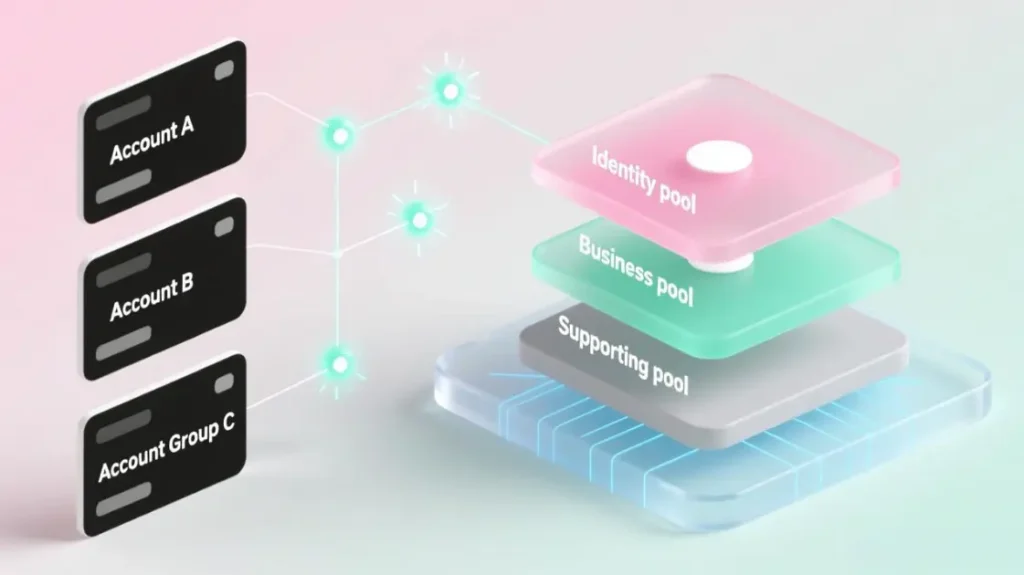
Step 1 – Define three traffic types per account
For each account, label its actions:
identity- Login
- 2FA / verification
- Changing email, password, payment details
- Device / session binding
business- Listing products, posting, campaigns
- Bids, pricing, inventory changes
- Order management and messaging
supporting- Browsing public sections
- Searching, reading dashboards
- Other read-only, non-critical views
Step 2 – Create three pools
In your proxy layer, create:
identity_pool- Small, very stable residential / ISP-residential IP sets
- Minimal rotation
- Country / region tightly aligned with each account’s profile
business_pool- Rotating residential or ISP-residential
- Can be partly backed by unlimited residential capacity for rotating business traffic
- Rotation constrained within predictable, region-correct ranges
supporting_pool- Unlimited / unmetered DC or ISP
- For low-risk, read-only use
Step 3 – Map accounts to IP slices
Create a simple mapping table, for example:
- For each account (or tight account group):
- Assign 1–3 home IPs from
identity_pool - Assign a slice (e.g. 20–50 IPs) from
business_pool
- Assign 1–3 home IPs from
Rules:
- Identity actions for an account always use its home IPs.
- Business actions choose from that account’s business slice (e.g. round-robin).
- Supporting actions use
supporting_pooland must never touch home IPs.
Step 4 – Control how often mappings change
- Do not rotate home IPs daily. Think in weeks or months, not hours.
- When you must rehome an account (region change, new IP slice), do it intentionally and log the change.
Unlimited plans fit here as follows:
supporting_poolcan be pure unlimited DC / ISP.business_poolcan mix metered and unlimited residential capacity.identity_poolstays small and stable, regardless of how much volume you push elsewhere.
5.3 How you know it’s working
Monitor:
- Login success rate per 100 login attempts.
- Number of 2FA / captcha events per 100 logins.
- Warning / suspension rate per 100 active accounts.
If this design is sound:
- Identity flows become boring and predictable.
- Business traffic looks busy but consistent in each region.
- Most raw request volume flows through
supporting_pool, not through home IPs.
6. Pattern 3 – Heavy monitoring and alerting
6.1 When this pattern fits
This is you if:
- You run many monitoring jobs (prices, stock, site changes, uptime).
- Jobs hit the same endpoints every few seconds or minutes.
- Historically, you pointed these jobs at the same routes as logins or business actions.
This is where “unlimited” gets destroyed: monitoring eats everything.
6.2 How to wire it
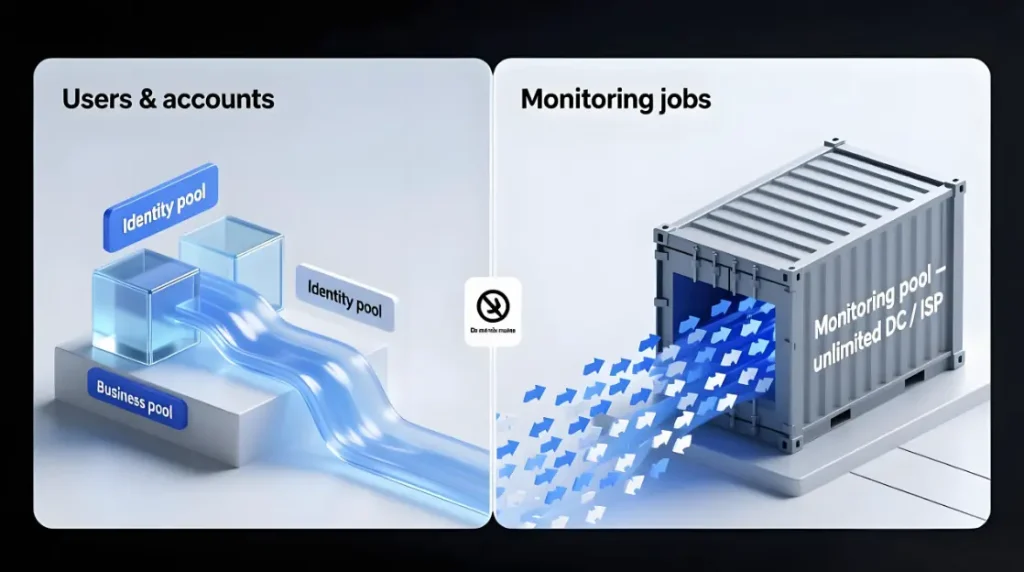
Step 1 – Separate monitoring config
Even if code is messy, give monitoring jobs their own proxy config:
- Separate credentials if possible.
- Separate pools.
Step 2 – Create monitoring-first pools
monitoring_pool- Unmetered / unlimited DC or ISP
- Tuned for high concurrency and high request rate
monitoring_resi_slice(optional)- Small residential subset
- Only for endpoints that truly block DC / ISP
Step 3 – Classify jobs by impact
For each monitoring job, label:
low_impact- Data can be 5–10 minutes late without serious harm
high_impact- Delays directly cost money or miss critical events
Routing:
low_impactjobs →monitoring_poolonlyhigh_impactjobs →monitoring_poolfirst, with fallback tomonitoring_resi_slicefor specific endpoints that consistently block DC / ISP
Step 4 – Protect account routes explicitly
Hard rules:
identity_poolIPs are never used for monitoring.business_poolIPs only see monitoring traffic if you make a conscious exception for a specific case.
Unlimited traffic can spike all day in monitoring_pool without poisoning your identity and business pools.
6.3 How you know it’s working
Track:
- Requests per minute per endpoint from
monitoring_pool. - 429 / captcha / other block rates on monitored endpoints.
- Whether alert quality improves (fewer false alarms, fewer misses).
If things are configured correctly:
- Monitoring traffic lives in its own noisy universe.
- Identity and business pools show slow, human-like curves, even when monitoring is aggressive.
7. Picking pricing models: metered, unmetered, and hybrids
Once routing is designed, choosing pricing is much easier.
7.1 Metered (per-GB) – when it’s fine
Per-GB plans are a good fit when:
- Workloads are predictable and moderate.
- You need residential identity but not extreme volume.
- You can attribute GB usage to specific projects or clients.
Examples:
login_poolin scraping setups.identity_pooland part ofbusiness_poolin multi-account setups.
7.2 Unmetered / unlimited – where it actually helps
Unmetered / unlimited is most useful where:
- You have high, continuous volume.
- Losing or retrying some requests is acceptable.
- Identity risk is low.
Examples:
bulk_poolin scraping.supporting_poolin multi-account operations.monitoring_poolin monitoring setups.
The pattern is the same as consumer broadband: many “unlimited” internet plans still ship with a Fair Use Policy. Independent broadband guides point out that a Fair Use Policy is usually there to limit how much bandwidth heavy users can consume so that everyone else still gets a normal experience — and that “unlimited broadband can still have a fair use policy” and be throttled after you cross a hidden threshold.
Broadband.co.uk’s guide to fair usage policies is a good example of how this works on the ISP side.
7.3 Thread-based unmetered plans – the hidden sweet spot
Some workloads are:
- High total volume, but
- Low concurrency (few long-running connections).
Here, per-thread unmetered plans can be ideal:
- You pay for how many “pipes” you open, not how full they are.
- Perfect for streaming, continuous syncing, logging, and long crawls.
Tie these to:
- Parts of your system that keep 5–20 HTTP sessions open for hours or days.
- Not to spiky, short-burst workflows.
Again, the key question shifts from:
“Is this truly unlimited?”
to:
“Does this billing model match how this workload behaves?”
8. How to test any “unlimited” plan before you trust it
Whatever plan you pick, treat the first 1–2 weeks as an experiment, not a permanent decision.
8.1 Build a simple test matrix
For each plan / pool, test several concurrency levels:
- e.g. 5, 20, 50, 100 concurrent sessions
At each level, measure:
- Success rate
- Average latency
- Error breakdown (timeouts, connection errors, 429/5xx)
Plot concurrency vs success rate for each pool.
Where the curve bends sharply downward is your practical limit for that “unlimited” plan.
8.2 Map tests to the Fair-Use Policy
Now read the Fair-Use Policy / ToS again and connect:
- “Typical business use” → your measured healthy range
- “Excessive bandwidth / concurrency” → where the curve begins to degrade
- “We may throttle or suspend” → the danger zone you should never enter in production
If docs don’t give numbers, rely on your test curves and set your own caps.
8.3 Lock in guardrails
Based on your tests, configure:
- Max concurrency per pool in your proxy manager or gateway.
- Per-domain concurrency caps in application code.
- Alerts for error-rate thresholds well below “everything is broken”.
That’s how you turn a fuzzy “unlimited” promise into a predictable operating envelope.
9. Putting it all together (and what to do this week)
If you strip away the marketing, “unlimited rotating residential proxies” are just one ingredient in a routing design:
- Cheap unlimited DC / ISP routes carry bulk and monitoring.
- Residential / ISP-residential routes carry identity and business-critical actions.
- Thread-based unmetered plans serve few-pipes, high-volume workloads.
- Clear routing rules keep these worlds separate but coordinated.
This week, you can:
- Classify your traffic into identity / business / bulk for your main domains.
- Create the basic pools (
bulk_pool,login_pool,identity_pool,business_pool,monitoring_pool) in whatever proxy manager you use. - Wire simple routing rules based on URL patterns and action types.
- Run a small concurrency test on each pool and plot success rate vs concurrency.
- Set soft limits in your configs based on where each curve starts to bend.
You don’t need a perfect provider.
You need a provider and a design that:
- Makes it easy to define multiple pools and routing rules.
- Exposes concurrency and fair-use limits clearly.
- Supports stable residential and ISP routes for identity and business flows, alongside unlimited rotating residential proxy pools for high-volume workflows when you actually need them.
Platforms like MaskProxy focus on the routing side of the problem — offering a residential and ISP proxy platform that behaves predictably under real workloads, instead of just printing “unlimited” in big letters.
The core question stops being:
“Is this plan truly unlimited?”
and becomes:
“With this routing design and these limits,
can my workflows run reliably, safely, and at a cost I can explain?”
If the answer is yes, then you’ve solved the real problem —
and “unlimited” is just one of the tools you used to get there.

Daniel Harris is a Content Manager and Full-Stack SEO Specialist with 7+ years of hands-on experience across content strategy and technical SEO. He writes about proxy usage in everyday workflows, including SEO checks, ad previews, pricing scans, and multi-account work. He’s drawn to systems that stay consistent over time and writing that stays calm, concrete, and readable. Outside work, Daniel is usually exploring new tools, outlining future pieces, or getting lost in a long book.