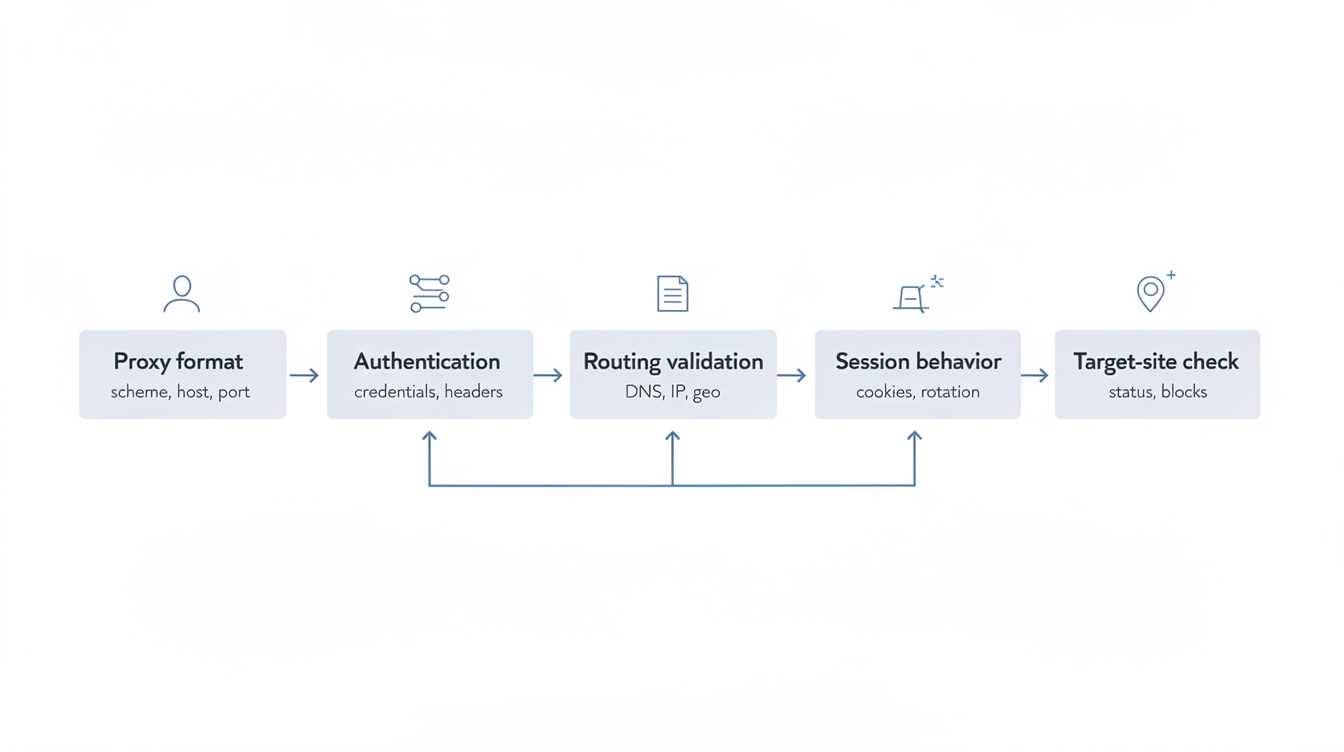
Proxy Health Check: A Scorecard Before Scaling Traffic

A proxy can pass a quick connection test and still fail when traffic scales. The first request works, but a larger run exposes timeout spikes, DNS mismatches, repeated exit IPs, poor reputation, or sessions that do not hold long enough for the workflow.
That is why a proxy health check should look beyond speed. Before you increase traffic volume, run a scorecard that checks whether the proxy route is available, consistent, and reviewable under the conditions your workflow actually uses.
What a Proxy Health Check Should Measure
A useful proxy health check answers six questions:
- Can the proxy connect consistently from the client you plan to use?
- Does DNS resolve in the expected place?
- Does the exit IP match the intended location and ASN profile?
- Is the IP reputation acceptable for the target workflow?
- Do latency and timeout rates stay stable across repeated requests?
- Does the session behavior match the task, especially for repeat access?
If the answer is unclear for any of these layers, the issue should be handled before scaling. A larger run usually amplifies proxy problems instead of hiding them.
The Proxy Health Scorecard
Use this scorecard before moving from a small trial to a larger batch:
| Health layer | Pass signal | Warning signal |
|---|---|---|
| Availability | Connection succeeds repeatedly from the intended client and port. | Frequent connect timeouts, inconsistent port behavior, or client-specific failures. |
| DNS behavior | DNS resolves through the expected route for the proxy type. | Local DNS leakage, inconsistent resolver location, or different results by client. |
| Location accuracy | IP, DNS, and browser-facing location signals align with the target route. | IP geolocation, DNS, locale, or route checks point to different regions. |
| Reputation | The IP is not clearly flagged by the reputation checks relevant to the workflow. | Known blacklist hits, noisy ASN history, or repeated access blocks. |
| Latency and timeout rate | Response time stays within the workflow’s tolerance across repeated tests. | Large latency swings, timeout clusters, or success rate dropping under light load. |
| Session stability | Sticky or rotating behavior matches the access pattern. | Unexpected IP changes, reused connections when rotation is expected, or short session lifetime. |
The point of the table is not to create a perfect score. It is to catch the layer that would make scaling unreliable.
Step 1: Start With Availability and Port Behavior
Availability is the simplest layer, but it still needs repeated checks. A single successful request only proves that one request worked. Test the same proxy route across the exact client, protocol, and port format you plan to use in production.
If timeouts appear, separate client settings from network behavior. A timeout can come from an incorrect port, a local client configuration issue, DNS handling, or an unstable upstream route. The SOCKS5 timeout checklist is a useful reference when the failure appears only in one client or protocol mode.
Step 2: Confirm DNS Behavior
DNS is often where a proxy route looks healthy but behaves inconsistently. If the browser, scraper, or command-line client resolves DNS locally while the proxy handles only the connection, the target can see a different route context than expected.
Check where DNS resolves, whether resolver location aligns with the exit route, and whether the result changes between clients. This matters most when the workflow depends on region consistency or when the target site changes behavior by location.
Step 3: Compare IP, ASN, and Location Signals
Location accuracy is more than a country label. Compare the exit IP, ASN, DNS behavior, and any browser-facing locale signals that are relevant to your workflow. A mismatch does not automatically mean the proxy is unusable, but it does mean the route needs review before traffic increases.
For a deeper route check, use a proxy exit IP check that includes ASN and DNS, not just an IP lookup page. If the proxy is used in a browser workflow, also compare the route against the browser-facing context described in the proxy location mismatch checklist.
Step 4: Review IP Reputation Before Volume
Reputation checks should happen before scaling, not after errors start. Look for obvious blacklist signals, repeated access blocks, or ASN patterns that do not fit the target workflow. This does not predict every outcome, but it reduces avoidable failures caused by poor IP history.
The important detail is scope. A reputation result is only useful when it matches the workflow. A route used for monitoring, account access, QA, or data collection may face different tolerance levels. For a focused process, review IP reputation and blacklist signals before increasing traffic.
Step 5: Measure Success Rate With Latency
Speed alone can mislead. A proxy that is fast for ten requests may be unstable over a longer run. Track success rate, timeout rate, and latency together so the team can see whether failures cluster under load.
Use a small but repeatable test window. Record the number of attempts, successful responses, timeout count, median latency, high-percentile latency, and any repeated error codes. This gives a clearer view than one average speed number. The same principle applies when comparing proxy success rate and speed.
Step 6: Match Session Rules to the Workflow
Session behavior is where many scaling plans fail. Some tasks need a stable route for repeat access. Others need rotation between requests. Problems appear when the session rule does not match the workflow: the IP changes too soon, does not change when expected, or gets reused because the client keeps a connection open.
Before scaling, define the expected session rule in plain language. For example: keep the same exit route for a short login sequence, rotate after a completed request group, or avoid reusing a connection across account contexts. Then test whether the proxy route actually follows that rule.
A Practical Pass, Watch, Fail System
For each health layer, assign one of three states:
| Status | Meaning | Action |
|---|---|---|
| Pass | The layer behaves as expected in repeated tests. | Proceed to the next layer. |
| Watch | The layer works, but has variation that may matter at scale. | Limit traffic and monitor before increasing volume. |
| Fail | The layer conflicts with the workflow or cannot be verified. | Fix the configuration or change route before scaling. |
A route with one watch item can often continue in a limited pilot. A route with a fail item should not be scaled until the reason is clear.
Where MaskProxy Fits
MaskProxy is useful when teams need proxy routes that can be evaluated by workflow, not only by headline speed. A practical private proxy setup should make it possible to compare route type, IP behavior, and stability before committing more traffic to the same pattern.
The scorecard helps keep that decision grounded. Instead of asking whether a proxy is generally good, ask whether this route is healthy enough for this workflow at this volume.
Final Checklist Before Scaling
- Run repeated connection checks with the real client and protocol.
- Confirm DNS behavior and resolver location.
- Compare exit IP, ASN, and location signals.
- Review IP reputation against the intended workflow.
- Measure success rate, timeout rate, and latency together.
- Confirm sticky or rotating session behavior before increasing volume.
If the scorecard is mostly pass with no unresolved fail items, the route is ready for a controlled increase. If the results are inconsistent, keep the test small until the weak layer is fixed.