This article explains how to purchase rotating residential proxy - GB, and how to continue using it when the traffic is insufficient or the package expires. Rotating residential proxy is used by GB of traffic. To continue using it, you usually need to purchase a new package or replenish the available traffic.
Step 1: Enter the store

- Log in to the MaskProxy dashboard.
- Click "Store" on the left menu.
- Select "Dynamic Home".
- View the GB traffic, validity period, unit price, event discounts and final price of different packages.
Step 2: Select a package
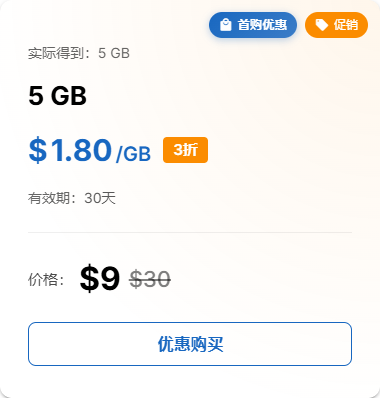
- Testing connections or small-scale tasks: Give priority to smaller GB specifications.
- Continuous collection, automation or multi-account tasks: Estimate package size based on daily traffic consumption.
- Cost-sensitive long-term missions: Comparing single GB prices and event discounts.
Step 3: Confirm the order and pay
- Click the purchase button of the corresponding package.
- The product is confirmed in the order summary to be "rotating residential proxy - GB".
- If there is a discount code, fill it in the checkout area and confirm the amount change.
- Select the payment method currently available on the page to complete the payment.
- After payment, wait for the order to be processed.
Step 4: Post-Purchase Check
- Enter "My proxy".
- Open “rotating residential proxy”.
- The new remaining GB traffic is displayed at the top of the confirmation page.
- If it does not appear immediately, refresh the page and check the "Purchase History" or contact support to verify.
How to renew or continue to use
rotating residential proxy - GB's core resource is GB traffic. When the remaining traffic is insufficient, the package is about to expire, or the number of tasks increases, you can return to the "Store" to purchase the dynamic residential package again. After the purchase is completed, go back to "My Proxy" to check whether the remaining traffic has been updated.
Common Notes
- Before purchasing, make sure you need a rotating residential proxy, not a static residential IP.
- Dynamic proxy is suitable for use based on traffic; if you need a fixed IP, you should choose a static proxy product.
- After purchasing, do not directly use the old parameters from a long time ago. It is recommended to reopen the background and copy the latest proxy information.
- If the order has not arrived for a long time, prepare the order number, payment time and payment voucher, and submit it for verification through "Contact Us".