This article explains how to extract rotating residential proxy in the MaskProxy dashboard. Before withdrawing, please confirm that the account has purchased rotating residential proxy - GB and there is still remaining traffic at the top of the page.
Step 1: Enter the extraction page
- Log in to the MaskProxy dashboard.
- Click "My proxy" on the left menu.
- Select “rotating residential proxy”.
- The remaining GB traffic is displayed at the top of the confirmation page.
Step 2: Select Region
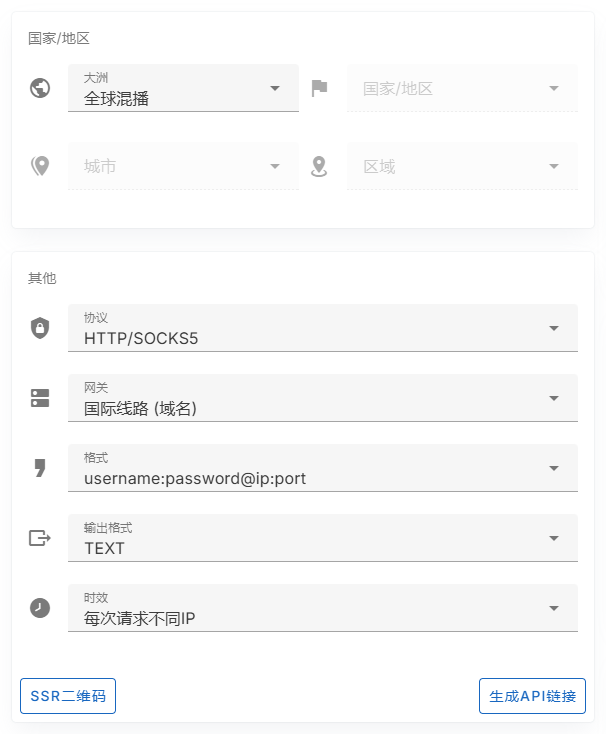
- First select the continent in the "Country/Region" area.
- If you need to specify a country, continue selecting the country/region.
- If the background supports the corresponding region, you can continue to select the city and region.
- If there are no explicit region requirements, you can leave the global mixcast or default options.
Step 3: Select Protocol, Gateway, and Format
- Protocol: Select HTTP or SOCKS5 protocol depending on your tool.
- Gateway: Usually choose the international line (domain name), the host example is gw.maskproxy.net.
- Format: The commonly used format is username:password@ip:port, which is suitable for copying to most tools.
- Output format: TEXT is generally selected for normal copying.
Step 4: Select the aging
The aging determines the IP switching strategy of the dynamic proxy. The default example in the screenshot is "Different IP for each request". If your task requires a more stable session, you can choose a longer duration based on the background options.
Step 5: Copy proxy
- If you only need one proxy, use the "Quick Copy" area on the right to copy the host, port, username, password or complete proxy.
- If you need multiple proxies, use "Batch Extraction" and then click "Batch Copy".
- If you want to connect to a program or system, save the current parameters before performing a connection test.
Step 6: Test with cURL Example
A cURL example will be generated at the bottom of the page based on the current configuration. You can copy this command into the command line to test the egress IP.
curl -x username:[email protected]:1288 http://ipinfo.io/jsonPlease do not send the complete proxy string, username, password or API link to public group chats, public work order screenshots or code repositories.